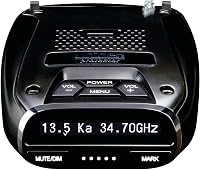
How to Use the Uniden R8 Radar Detector
To use the Uniden R8 radar detector, mount it level on the windshield, plug it in, and let the dual antennas and arrows show which direction a threat comes from. Set the auto-mute memory early so locked-out false alerts stop repeating.
On this page (8 sections)
- How do you mount the Uniden R8 for the best range?
- How do you power on and set up the Uniden R8?
- How do you read the arrows and voice alerts?
- How do you quiet false alerts with auto-mute memory?
- How do you hardwire the Uniden R8?
- Which settings should you change on the Uniden R8?
- How do you keep the Uniden R8 updated and working well?
- What is the fastest way to learn how to use the Uniden R8 radar detector?
To use the Uniden R8 radar detector, mount it level on the windshield, plug it in, and let the dual antennas and directional arrows tell you where a threat comes from. Lock out the false alerts you pass every day so the detector stays quiet on your usual routes.
The R8W is Uniden's flagship windshield-mount model. It pairs long-range detection with voice alerts, built-in GPS, and camera locations, so the first few drives are mostly about placement and learning what each alert means.
This guide walks through setup, reading alerts, quieting falses, and keeping the unit updated.
How do you mount the Uniden R8 for the best range?
Mount the R8 level on the windshield, with a clear view down the road and no wiper or tint blocking it. A detector that points at the sky or the hood loses range before you reach the first curve.
The Uniden Large Premium Suction Mount holds the R8 firmly and lets you set the angle. Clean the glass first, press the cup down hard, and check the bracket doesn't wobble.
For the full installation steps and placement options, see how to install a radar detector.
Placement matters more than accessories. Keep the detector out of direct sun when parked, and don't let a phone mount or dash cam crowd the same spot.
A detector that slides or tilts during a drive is worse than one mounted an inch lower but solid. If you want to compare bracket styles, our guide to the best radar detector mounts covers suction, visor, and permanent options.
How do you power on and set up the Uniden R8?
Plug the coiled cord into the detector and your 12-volt socket, press power, and run through the menu once before you drive. After that the R8 starts in its last-used mode each time.
The OLED display and voice prompts guide the menu. Set your preferred brightness, choose a mode, and turn on the alerts you want.
The R8W has Wi-Fi, Bluetooth, and GPS built in, so pairing the R/TACH app on your phone lets you adjust settings from a larger screen.
If you'd rather skip the socket, a hardwire kit frees the outlet and adds a remote mute button. That's the cleaner route for a daily driver.
How do you read the arrows and voice alerts?
Front, side, and rear arrows show where the signal is coming from, and the voice calls out the band and strength so you can keep your eyes on the road. A front arrow means the source sits ahead; a rear arrow means it's behind you.
The R8 uses dual antennas, so it detects from all four directions. Arrows light as the signal grows, then flip as you pass the source.
Voice alerts name the band type and signal strength, which helps when you can't look at the display.
Treat the first beep as a prompt to check your speed, not a reason to brake hard. An arrow pointing behind you after a pass usually means you've gone by the source.
The band label matters too: Ka and K alerts deserve more attention than a brief X blip in a city.
How do you quiet false alerts with auto-mute memory?
When a known false alert sounds, press mute once to silence it, or double-press to store that spot so the R8 ignores it next time. Built-in GPS lets the detector learn the door alarms and repeat falses on your daily routes.
The R8 can remember and automatically mute false alerts along your routes. Each locked-out location stays quiet on future passes, so a shopping center door opener stops chirping every morning.
That's the single biggest change to how the R8 feels day to day.
Use it on fixed sources only. Locking out a stretch of road where real enforcement appears would train the detector to ignore a genuine threat.
Our guide to how to update a Uniden radar detector also covers the database that feeds camera alerts.
How do you hardwire the Uniden R8?
Wire the smart hardwire kit into a fuse in the panel and mount the small control box within reach, so the detector powers on with the car and the 12-volt socket stays free. The kit includes a remote mute and mark button plus LED indicators.
The mute and mark button lets you silence an alert without reaching for the detector. The power LED confirms the unit is on, and the alert LED blinks when a signal arrives.
The kit fits R8, R8w, R7, R4w, R4, R3, R1, DFR9, DFR9BLK, DFR8, DFR7, and DFR6 models.
Follow the fuse tap instructions and pick a circuit that switches off with the ignition. A hardwire install is best done with the car off.
The same kit works across several Uniden models, so it carries over if you change detectors later.
Which settings should you change on the Uniden R8?
Turn on GPS for camera alerts and auto-mute memory, set a brightness you can read in daylight, and choose the mode that fits where you drive. These three settings do most of the work in the first week.
Built-in GPS powers the red light and speed camera alerts. The R8W comes with pre-loaded camera locations and a free database, so turning GPS on gives you warnings as you approach intersections and speed traps.
Leave the auto-mute memory on so repeat falses fade.
Brightness matters more than most people expect. The OLED screen washes out in direct sun at a dim setting.
Set it brighter for daytime and dimmer for night driving.
Voice alerts are programmable. You can match the volume and type to your car, and mute the ones you don't need.
The goal is hands-free operation so your eyes stay on the road.
How do you keep the Uniden R8 updated and working well?
Update the firmware and camera database regularly, wipe the screen and lens, and recheck the mount whenever it rattles. A detector that drifts out of level slowly loses range without any warning.
The R8 has Wi-Fi and Bluetooth, so updates don't need a cable. Red light and speed camera locations ship free and update from the database.
Run a firmware check before a long trip rather than in the parking lot at the start.
Keep the windshield area clean. Dust on the detector's lens reduces sensitivity, and a smudged mount weakens the suction cup.
Re-press the bracket if it starts to lean.
Check local rules as well. Some states restrict detector use, so read how to use a radar detector legally before you rely on the alerts.
The R8 is a driving aid, not a license to speed.
What is the fastest way to learn how to use the Uniden R8 radar detector?
Mount it level, power it up, drive your normal route, and lock out each false alert as it appears. The arrows and voice alerts become second nature within a few trips.
Start with the Uniden Large Premium Suction Mount for a steady, level fit. Add the smart hardwire kit when you want the mute button within reach and the socket free.
Update the firmware and camera database before the first long drive.
Read alerts as information, not instructions. A front arrow tells you where the signal is; the band tells you how seriously to treat it.
Lock out only fixed false sources you've confirmed, and leave the rest alone.
The Uniden R8W is the version this guide centers on, with the same windshield-mount design and dual antennas. Set it up once, learn its voice, and the drive gets quieter from there.
Frequently asked questions
How do you turn on the Uniden R8 radar detector?
Plug the power cord into the detector and your car's 12-volt socket, then press the power button. The R8 starts in its last-used mode, and the power LED confirms it's on.
For a cleaner install, wire it into the fuse box with a hardwire kit.
What do the arrows on the Uniden R8 mean?
The arrows show which direction the signal comes from: front, rear, or both sides. Dual antennas give full 360° awareness, so you'll see front, rear, and side arrows as the signal moves around your car.
Trust the arrow direction to judge where the threat is.
How do you mute false alerts on the Uniden R8?
Press the mute button when a known false alert sounds, or double-press it on a GPS model to store the location in auto-mute memory. The R8 can remember store door alarms and other repeat falses along your routes so you don't hear them again.
How often should you update the Uniden R8?
Update the firmware and the red light and speed camera database whenever a new release is posted. The R8 has built-in Wi-Fi and Bluetooth, so updates are quicker than with a cable.
Run them before a long trip so camera alerts stay current.