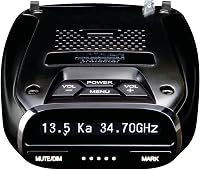
How to Install a Radar Detector
To install a radar detector, mount it with a clear windshield view, then connect a compatible power cord or hardwire kit. Keep the cable clear of controls and airbags, and check the detector and vehicle manuals before you begin.
On this page (7 sections)
- How do you install a radar detector step by step?
- How should you choose a mount and power source?
- Where should you mount a radar detector?
- How do you route the cable safely?
- What should you check after installation?
- What mistakes should you avoid when installing a detector?
- Which installation should you choose?
To learn how to install a radar detector, start by choosing a legal, stable mounting spot with a clear view through the windshield. Then choose power that matches your detector and vehicle, route the cable clear of controls and airbags, and confirm everything stays secure before driving.
A straightforward setup has 3 choices: where the detector will sit, how it will receive power, and how the cable will reach it. Check the detector and vehicle manuals, then review local radar detector rules before mounting.
How do you install a radar detector step by step?
Choose a mounting spot, attach the detector, connect a compatible power source, and secure the cable. Use the detector manual for its preferred position and setup.
- Park safely and turn off the vehicle.
- Check the windshield for a clear view, airbag locations, controls, and restricted areas.
- Attach the supplied mount or a compatible alternative according to its instructions.
- Connect a cord or hardwire kit that matches your detector and vehicle.
- Route and secure the cable away from controls and moving parts.
- Turn the detector on, then check the mount and cable again.
A plug-in cord is usually a simple first choice if your detector and vehicle have compatible ports. If you need a different mounting arrangement, compare radar detector mounts and brackets.
How should you choose a mount and power source?
Choose based on your detector model, available ports, preferred mounting position, and comfort with wiring. Check compatibility before buying, since a similar-looking connector or mount may not fit your device.
A windshield mount suits drivers who want a simple setup and a position they can adjust. A mirror-rod mount can free up windshield space, but only if the detector and mirror stem fit the mount.
Hardwiring can leave the vehicle’s 12-volt outlet free, though it involves working near the fuse panel.
For a broader overview of detector features and setup choices, read our guide to radar detectors for cars.
Which power option fits your setup?
Use a plug-in cord for a simpler connection, USB-C when both ports are suitable, or hardwiring when you want a direct fuse-panel connection. The best option is the one that matches your detector and vehicle without creating a risky cable route.
The Escort SmartCord suits compatible Escort windshield-mounted detectors and standard 12-volt outlets. Its coiled section adds reach, while the mute button and indicator lights remain within reach; it also has a USB charging port.
Some newer BMW outlets may have non-standard dimensions, so check the cord’s fit before relying on it. If your vehicle’s outlet does not suit the cord, consider a compatible alternative.
The Uniden USB-C to RJ11 Power Cord suits drivers with a compatible Uniden detector and a vehicle USB-C port that provides suitable power. It is 6 ft long and avoids a fuse-panel connection.
It fits listed Uniden models such as the R8W, R8, R7, R4W, R4, R3, DFR9, DFR8, and DFR7. Confirm your exact model and vehicle port before choosing it.
When should you choose a hardwire kit?
Choose hardwiring if you want a direct fuse-panel connection and can follow the vehicle and kit instructions. Skip it if you are unsure about vehicle wiring; a qualified installer can handle the connection.
The Uniden Smart Hardwire Kit works with compatible models including the R8W, R8, R7, R4W, R4, R3, and R1. Its remote Mute/Mark button and LED indicators give you a control point within reach, and the direct connection leaves the 12-volt outlet free.
Use the kit and vehicle instructions for fuse selection, connection, and cable placement. This is a poor fit if your detector is not among the compatible models or you would need to guess at wiring steps.
Where should you mount a radar detector?
Mount it where the windshield view is clear, the detector is stable, and the display is easy to glance at. Keep it out of your direct sightline and within the legal mounting area.
Follow the detector manual for position and avoid places where tint, a coating, or a windshield feature may interfere. Do not assume that placing the detector as high or low as possible will improve performance.
Check the vehicle manual for airbags near the windshield pillars and roofline. Never route a cord across an airbag cover or through a path where it could be pulled during deployment.
A mirror-area mount may work if the detector and mirror stem are compatible. For that installation style, follow our rearview mirror mounting guide.
Can you use a mirror-rod mount?
Use one only when it fits both your detector and mirror stem. Check the model compatibility and required clearance before buying.
The SDSACZMU Aluminum Mirror Rod Mount suits several Uniden models, including the R1, R2, R3, R4, R6, DFR7, DFR8, and DFR9. It does not fit the Uniden R7 or R8, and it needs 1 in of mirror-stem space.
Skip this mount if your detector is incompatible or your mirror stem lacks the needed space. Tighten and position the mount according to its instructions, then check that it remains stable.
How do you route the cable safely?
Keep the cable away from airbags, pedals, steering, shifters, and other moving parts. Secure extra length so it cannot drop into the driver’s control area.
Plan the route before connecting power. The cord should reach without pulling tight, crossing your sightline, or hanging near your legs.
Use only cable clips or attachment methods allowed by the vehicle and detector instructions. Do not wedge a cord beneath trim or a headliner if it could interfere with an airbag or damage wiring.
Once routed, sit in the driver’s seat while parked and move the controls through their normal range. Reposition the cord if it catches, pulls, or falls toward a control.
What should you check after installation?
Confirm that the detector powers on, stays firmly mounted, and has a clear windshield view. Recheck the setup after your first short drive, once parked.
Look for a shifted mount, loose connector, or cable that has slipped toward a control. Keep the display visible enough to glance at without stretching or taking your attention from the road.
If the detector does not power on, turn off the vehicle and check the connections against the manuals. Do not probe vehicle wiring or change fuse connections unless you know the correct procedure.
Keep the detector and mount clean and free of anything that blocks the detector’s view. Before a trip, check that the mount is still firm and that the cord has not moved.
What mistakes should you avoid when installing a detector?
The most common setup errors are choosing an incompatible accessory, blocking your view, and routing a cable near safety systems. Check fit and placement before making a permanent change.
- Buying by connector shape alone: confirm the exact detector model and cord compatibility.
- Assuming every mount fits: check detector compatibility and mirror-stem clearance.
- Hiding the cable without checking airbags: follow the vehicle manual and keep wiring out of deployment paths.
- Making a permanent connection too soon: try a compatible plug-in option first if it suits your vehicle.
- Ignoring local rules: confirm where windshield devices are allowed before mounting.
A detector can alert you to signals, but it does not make speeding safe or legal. For a plain-language explanation of detector alerts, see what a radar detector does.
Which installation should you choose?
Choose a compatible plug-in cord for a simple setup, USB-C if your Uniden detector and vehicle port support it, or hardwiring if you want a direct fuse-panel connection. Choose a mirror-rod mount only when both the detector and mirror stem fit.
The Escort SmartCord is the practical choice for compatible Escort detectors with standard 12-volt outlets. The Uniden USB-C cord fits compatible Uniden detectors when the vehicle has a suitable USB-C port; the hardwire kit suits compatible models when freeing the outlet matters and the wiring can be done safely.
For the mount, pick the SDSACZMU only for a compatible Uniden model with enough mirror-stem space. If you are still deciding where the detector should sit, review how to install a radar detector on the rearview mirror before you start.
Frequently asked questions
Where should I mount a radar detector?
Mount it where it has a clear view through the windshield and where you can see its display with a brief glance. Keep it out of your direct sightline and away from airbags, controls, and restricted windshield areas.
Check the detector manual and local rules.
Can I install a radar detector without hardwiring it?
Yes. Many detectors can use a compatible cord connected to a vehicle power outlet.
Route the cable so it won't interfere with pedals, steering, shifter movement, or airbags.
Confirm that the cord matches your detector and vehicle outlet before connecting it.
Is it safe to hardwire a radar detector?
A compatible detector can connect to the vehicle fuse panel with a hardwire kit. Follow the kit and vehicle instructions, and use a qualified installer if you aren't comfortable working near vehicle wiring.
Keep the cable away from airbags and moving parts.
Can a radar detector go on the rearview mirror?
Some detectors can be mounted near the rearview mirror with a compatible mount, but fit depends on the mirror stem, detector, and available space. Check the mount's compatibility details and instructions.
Keep the detector stable and within local windshield-mounting rules.