Can You Bring a Radar Detector on a Plane?
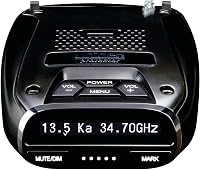
Yes, you can bring a radar detector on a plane. The TSA does not list radar detectors as a prohibited item, so you can pack one in your carry-on or checked bag. The bigger questions are the state laws where you land and whether you want to risk losing an expensive unit in checked luggage.
On this page (8 sections)
- Can you bring a radar detector on a plane in carry-on or checked bags?
- What does the TSA say about radar detectors in luggage?
- Will airport security stop you over a radar detector?
- Are radar detectors legal where you're flying to?
- How should you pack a radar detector for a flight?
- Should you fly with a detector or leave it at home?
- Which gear makes a detector easier to travel with?
- What should you do when you land?
Yes, you can bring a radar detector on a plane. The TSA doesn't list radar detectors as a prohibited item, so one can travel in your carry-on or your checked bag.
The questions that matter more are the state laws where you land and how you pack a unit so it arrives working.
This matters most for people who already own a detector and want it on a road trip after the flight. The screening side is simple, and the legal side depends on where you drive.
Here's how to handle both.
Can you bring a radar detector on a plane in carry-on or checked bags?
You can bring a radar detector on a plane in either bag, because the TSA treats it as a general electronic device rather than a prohibited item. That puts it in the same broad group as a phone, a tablet, or a dash cam.
The choice between carry-on and checked bag is about protection and convenience, not permission.
Carry-on is the safer default. The bag stays with you, the unit avoids the rough handling of the cargo hold, and nothing goes missing in a transfer.
A detector is small enough to fit in a backpack compartment or a padded pouch beside a laptop.
Checked luggage works too, and it frees up carry-on space for the trip. If you go that route, wrap the detector in clothing and keep the mount and power cord in a separate bag so the windshield bracket doesn't press against the screen.
For a closer look at what the unit itself does, see what does a radar detector do.
What does the TSA say about radar detectors in luggage?
The TSA's prohibited items list doesn't include radar detectors, so standard screening applies. Your bag goes through the X-ray machine as usual, and the unit's electronics look like any other small device on the screen.
Screening officers are looking for weapons and hazardous materials, not driving accessories. In most cases the bag passes without a second look.
If an officer asks about a device, answer plainly and let the bag go through a second scan if asked. That's routine and doesn't mean anything is wrong.
The TSA's rules focus on items that could hurt someone or damage an aircraft. A detector powered by a 12-volt cord in a bag poses neither risk.
The rules can change, so check the current list before a flight if you want certainty. Even so, the history here is clear: detectors travel as ordinary electronics.
Will airport security stop you over a radar detector?
Security won't stop you for the detector itself, though it can draw a question or a second pass through the scanner. A small box with a screen and a coiled cord is unfamiliar to some officers, and that can prompt a quick check.
Keep the unit easy to reach so you can show it without unpacking everything. Leave the power cord wrapped and the mount detached.
If the bag is flagged, follow instructions and keep the conversation short.
The same applies at international airports. Security is screening for safety, not enforcing driving laws.
What happens after you land is a different matter, and that's where the state rules come in. No officer at the checkpoint is there to confiscate a detector that isn't a safety risk.
Are radar detectors legal where you're flying to?
Detector laws vary by state, so check the rules for the place you'll actually drive before you pack. Virginia and Washington, D.C. restrict detector use, and some states have extra rules for commercial vehicles.
Flying into one of those places with a detector in the bag is fine; using it there isn't.
If you land in a state where detectors are restricted, leave the unit switched off and stowed in the trunk or glove box. You can carry it through the airport without using it.
Our guide to where are radar detectors illegal lists the states with restrictions so you can plan the route before you book.
If your trip crosses state lines, map the whole drive, not just the airport city. A unit that's legal at home can become a problem 200 miles into the trip.
Check each state on your route and know when to switch it off. The law where you drive decides whether the unit goes on the windshield.
How should you pack a radar detector for a flight?
Pack the detector so the screen and cord are protected and the mount stays separate. A padded pouch or a rolled shirt works well, and the original box is better still if you kept it.
The unit is small, so it fits easily in a carry-on pocket.
Follow the carry-on rules for electronics. A detector's power cord isn't a lithium battery, so it doesn't fall under the spare-battery limits.
Leave the cord coiled and the plug capped, and keep the mount in a zip bag so its bracket doesn't snag on clothing.
If you're checking the bag, put the detector in the middle of soft items and away from the bag's edges. Don't pack it against a hard case or a metal object that could press on the screen.
Take the windshield mount off first; a bracket left on the unit is the part most likely to break in transit.
Should you fly with a detector or leave it at home?
Bring the detector only if the drive after the flight is long enough for alerts to earn the space. A weekend in a city with short trips doesn't need one.
A multi-state road trip or a long highway run is where a detector proves useful.
Think about the rental car too. Many rentals include navigation and phone mounts, so check what's already there before you pack.
A detector you won't mount just adds weight and a small risk of damage. If you'll be driving unfamiliar highways with changing speed limits, the unit can help you stay aware of alerts.
Use the rule that fits the trip: pack it for long highway drives where you'll have the unit mounted and switched on, and leave it home for city breaks with short hops. If you do bring it, confirm the rules for each state first.
A detector that stays in the bag the whole trip is just extra luggage.
Which gear makes a detector easier to travel with?
The right accessories make a detector easier to pack and quicker to set up in a rental car. A hardwire kit keeps the cords tidy and the unit discreet, and a compact detector travels lighter than a large one with directional arrows.
Each option below solves a different travel problem.
Best for a clean install in a rental car
The Uniden RDA-HDWKT wires a compatible Uniden detector straight into the fuse box and adds a remote mute and mark button within reach. It fits models including the R8w, R8, R7, R4w, R4, R3, R1, DFR9, DFR9BLK, DFR8, DFR7, and DFR6.
The power-on LED and the radar and laser alert LED let you confirm it's working at a glance. Skip it if you don't want to touch a rental's fuse panel; a plug-in cord is the simpler travel choice.
Best for long highway trips
The Uniden R3 pairs long-range sensitivity with advanced false alert filtering, which suits a driver covering a lot of interstate. Its GPS lets it remember and mute common false alerts like store automatic doors along your usual routes.
Red light and speed camera locations come preloaded, and free database and firmware updates keep them current. Voice alerts keep your eyes on the road.
It's the unit to pack when the trip is mostly highway miles.
Best for 360-degree coverage
The Uniden R7 detects from all four directions and uses arrows to show where the signal is coming from, with band and signal strength for each. Its multi-color OLED display can show up to four signals at once.
GPS mute memory works the same way as on the R3. This is the pick if you want the most situational detail from a single unit.
If budget is the deciding factor on the trip, our guide to the radar detector for the money covers cheaper options.
What should you do when you land?
Switch the detector on only after you've checked the law for the state you're driving in. Mount it, connect the power, and leave the settings you used at home in place unless the route calls for changes.
The legal way to run one on a road trip is the same as at home, so the pre-flight check is the main extra step.
If you're unsure about local rules or a rental agreement, leave the unit off and rely on posted speed limits. That's always allowed and avoids a ticket for a device you didn't need.
A detector is a driving tool, not a travel permit.
Use how to use a radar detector legally as your checklist for the drive. For anyone flying with a detector, the answer stays simple: pack it in your carry-on, know the state rules, and keep it off where it isn't allowed.
Frequently asked questions
Does TSA allow radar detectors in carry-on bags?
Yes. The TSA does not list radar detectors as a prohibited item, so they can go in carry-on bags.
Pack it so the power cord stays coiled and the unit doesn't press against other electronics, and expect the bag to go through the scanner as normal.
Are radar detectors legal in every US state?
No. Virginia and Washington, D.C. restrict detector use, and some states have rules for commercial vehicles.
Check the law where you land and plan to leave the unit switched off if it isn't allowed there.
Can airport security take a radar detector away from you?
No, it isn't a prohibited item. A security officer may ask about it during screening or send the bag for extra review, which is routine for electronics.
You should get the unit back either way.
Do you need a radar detector when you rent a car?
Only if you drive long highway stretches where alerts help. Rentals often come with navigation and phone mounts already, so decide before you pack whether the unit earns its space.