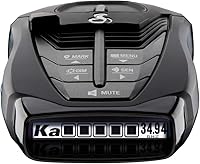
What Is Ka Band on a Radar Detector?
Ka band is a group of microwave frequencies used by police radar to measure vehicle speed. A Ka alert means your detector has received a signal in that range, but it doesn't identify the source or prove that a speed measurement is aimed at you.
On this page (6 sections)
Ka band on a radar detector is a range of microwave frequencies that police radar can use to measure vehicle speed. A Ka alert means the detector received a signal in that range, but it doesn't prove where the signal came from or whether it was aimed at your car.
Ka is one of several alert labels a detector may show. Understanding the label helps you respond calmly, but no detector alert replaces safe driving or tells you to speed.
What does Ka band mean on a radar detector?
Ka band means the detector has picked up a signal in the Ka microwave range. Police radar can use signals in that range to measure vehicle speed.
The alert reports the type of signal the detector recognized. It doesn't identify the radar unit, show the officer's location, or confirm which vehicle was measured.
Some detectors display a band label with a tone or voice prompt. The exact display and alert behavior depend on the model and its settings.
If you're new to these devices, what a radar detector does explains the difference between detecting a signal and preventing a ticket. Detection is information for the driver, not permission to ignore speed limits.
What is the difference between Ka band and K band?
Ka and K are separate radar bands, and a detector treats them as different alert types. Both may be relevant to speed enforcement, so the label alone doesn't tell you which alert is more important.
Your detector's manual explains how it names and displays each band. Local use can also vary, so keep the settings that provide coverage where you drive unless you have checked what a change would disable.
For a side-by-side explanation, see K band vs Ka band. It covers what each alert means and why drivers should avoid making assumptions based only on the label.
Which frequency band does a Ka alert use?
A Ka alert refers to signals in the Ka frequency range, rather than K or X band. The exact frequencies your detector can receive depend on the model.
For example, the Uniden R3 and Cobra RAD 480i support 34.7 GHz. The Radenso XP supports Ka band, though its product data doesn't specify a Ka frequency.
These examples show why it's useful to check a detector's supported bands and alert options. A model name or a general “radar detector” label doesn't tell you every frequency it covers.
Why can a Ka alert be brief or change in strength?
A changing Ka alert tells you that the signal received by the detector is changing. It doesn't reveal the source's distance or confirm that a radar operator has targeted your vehicle.
Signal strength can vary as your vehicle moves or the signal's path changes. A brief alert also doesn't prove the signal was false; treat it as information, stay aware of your surroundings, and drive within the posted limit.
A detector's filtering may reduce alerts it classifies as false, but filtering behavior varies by model and settings. The Cobra RAD 480i describes filtering for some vehicle systems, while the Uniden R3 and Radenso XP can remember common false-alert locations using GPS.
A saved lockout is a setting tied to a location, not proof that every future signal there is harmless. Review your manual before relying on any mute or filtering feature.
Can a Ka alert tell you where police are?
No. A Ka alert alone doesn't identify the transmitter's location or show whether it is police radar.
It also cannot tell you whether a signal is aimed at your vehicle.
Use the alert as a reason to stay attentive and obey the speed limit. Don't use a detector to chase a signal, make sudden moves, or drive faster because an alert stops.
Some detectors connect to apps or communities that share driver reports. Those reports are separate from the detector's Ka signal and may be incomplete or outdated.
For a broader look at detection limits and driver expectations, read do radar detectors work anymore?. It helps put alerts in context without treating them as a guarantee.
Should you turn Ka band off?
Keep Ka detection on unless you understand the coverage you would give up. Turning off a band can stop your detector from alerting to signals in that range.
The right setting depends on your device, the places you drive, and local rules. Consult the manual before changing bands, filtering, or muting options, and check applicable laws before using a detector.
If your main question is whether detector use is allowed on a particular road or in a particular vehicle, start with how to use a radar detector legally. Rules can differ by location and vehicle type.
What should you check before buying a detector for Ka alerts?
Check the supported frequency bands, alert controls, and features that matter for your routes. A detector's feature list can help you compare options, but it doesn't promise a particular warning distance or outcome.
The Cobra RAD 480i supports 34.7 GHz and includes front and rear detection, Bluetooth, and shared alerts through its app features. Those are separate functions from simply identifying a Ka signal.
Choose based on the functions you want and the detector's documented coverage. Read the manual for how it displays and filters alerts before relying on those settings.
What should you do when the detector alerts to Ka?
Stay focused, check your speed, and follow the road rules. The alert tells you the detector received a signal in a band that may be used for radar speed measurement.
Don't assume that a weak or short alert is safe to ignore, and don't assume that every Ka alert confirms police radar. A detector reports signals; it doesn't make a decision about your speed or driving.
A Ka alert is most useful when you understand its limits. Keep the detector's relevant bands enabled, learn what its tones and labels mean, and use it as one source of awareness while driving responsibly.
Frequently asked questions
What does Ka band mean on a radar detector?
Ka band is a range of microwave frequencies that police radar can use to measure vehicle speed. A Ka alert means your detector picked up energy in that range, but the alert alone doesn't tell you who sent it, where the radar is, or whether it was aimed at your car.
Is Ka band the same as K band?
No. Ka and K are separate radar frequency bands, and detectors label them as different alert types.
Both can be used for speed enforcement, so don't treat one as harmless or switch it off unless you understand what coverage you'll lose in your area.
Why does my radar detector show a Ka alert?
Your detector shows Ka when it receives a signal it recognizes in the Ka range. Police radar is one possible source, but the alert by itself cannot confirm the source or a specific vehicle being measured.
Follow the road rules and use the alert as a prompt to stay attentive.
Should I turn Ka band off?
Usually, keep Ka detection enabled unless you have a specific reason and understand the coverage tradeoff. Turning it off can prevent the detector from alerting to Ka radar.
Check your detector's manual and local laws before changing band settings.