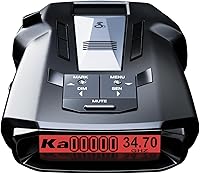
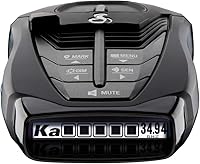
Cobra RAD 480i Review: The Popular Bluetooth Detector (October 2026)
The Cobra RAD 480i is a good fit for drivers who want Bluetooth community alerts, front and rear detection, and a choice of windshield or dash mounting. Skip it if built-in GPS filtering is a must.
On this page (9 sections)
- What does the Cobra RAD 480i review find?
- Is the RAD 480i the right kind of radar detector?
- How useful are Bluetooth and shared alerts?
- How do the RAD 480i alternatives differ?
- What should you expect from detection and filtering?
- How should you set up the RAD 480i?
- What common mistakes should you avoid?
- Who should buy the Cobra RAD 480i?
- Is the Cobra RAD 480i worth considering?
The Cobra RAD 480i review verdict is straightforward: choose it for phone-connected community alerts and flexible mounting, but skip it if built-in GPS filtering is essential. The RAD 480i detects radar and laser signals from the front and rear, and connects to Cobra's iRadar app over Bluetooth.
It suits drivers who will keep a compatible phone connected and want alerts that can appear through a compatible CarPlay or Android Auto display. Drivers who want a detector to remember false alert locations on its own should compare the GPS-equipped RAD 700i or Uniden DFR7.
What does the Cobra RAD 480i review find?
The Cobra RAD 480i is best for drivers who value app-connected alerts and simple placement choices. It includes a windshield suction mount, a dash fastener and a 12V power cord, so you can plan the installation around your cabin.
Cobra RAD 700i: Best for GPS filtering

- Built-in GPS
- AutoLearn Intelligence
- Front and rear LaserEye detection
- Five-color OLED display
Step up to the RAD 700i if built-in GPS and AutoLearn filtering matter more than the RAD 480i's straightforward setup. It also connects to the Drive Smarter community for shared alerts.
Pros
- Built-in GPS and AutoLearn Intelligence
- Customizable five-color OLED display
- Front and rear detection
- Drive Smarter shared alerts
Cons
- Larger than the RAD 480i
- No included mounting accessories are specified
The RAD 480i combines front and rear LaserEye detection with Bluetooth community alerts. Its Digital Signal Processing handles incoming signals, while Cobra's updateable IVT filter and anti-falsing circuitry are designed to reduce alerts from vehicle systems such as blind spot monitoring.
Those features support awareness, but a detector cannot guarantee that it will identify every signal or provide enough warning in every situation. Treat alerts as one source of information, keep your attention on the road and follow local laws.
Is the RAD 480i the right kind of radar detector?
The RAD 480i is a connected detector, so its community features are most useful when you plan to use the phone app. It responds to radar and laser signals directly, while Bluetooth provides a separate route to alerts shared by other drivers.
That distinction matters when you compare it with a GPS-equipped model. GPS can support memory for recurring locations, while a community network depends on information shared by drivers and a phone connection.
Decide which kind of filtering and information fits your regular routes.
The RAD 480i does not specify built-in GPS. If remembering recurring false alert locations is a priority, the RAD 700i offers GPS-based AutoLearn Intelligence, and the Uniden DFR7 has GPS mute memory.
How useful are Bluetooth and shared alerts?
Bluetooth is useful if you want community alerts and route information through a connected phone. The RAD 480i connects with Cobra's iRadar app to receive and share alerts from other drivers.
Cobra also identifies compatibility with Apple CarPlay and Android Auto, which can let you view a route and interact with alerts on a compatible vehicle display. Set up the phone, app and vehicle connection before driving so you are not troubleshooting while moving.
Community alerts add context, but they do not replace the detector's direct signal alerts. They also rely on a working phone connection, so drivers who prefer a stand-alone setup may get less value from the RAD 480i's connected features.
For more detail on that choice, see our guide to radar detectors with Bluetooth and phone alerts. The guide to what a radar detector does explains what signal alerts can and cannot tell you.
How do the RAD 480i alternatives differ?
The main decision is whether you want GPS memory, adjustable filtering controls or phone-connected alerts. These four models have different strengths, so compare the feature that solves your main annoyance rather than choosing by brand alone.
| Model | Main distinction | Consider it if you want |
|---|---|---|
| Cobra RAD 700i | Built-in GPS, AutoLearn and a five-color OLED | Location-based filtering and a customizable display |
| Cobra RAD 480i | Bluetooth community alerts and two mounting options | App-connected alerts and flexible placement |
| Cobra RAD 490i | Adjustable sensitivity, USB-C power and firmware updates | More control over filtering modes |
| Uniden DFR7 | GPS mute memory and camera alerts | Memory for common false alerts and voice warnings |
Choose the RAD 700i if GPS-based AutoLearn matters most. It also connects to the Drive Smarter community and has a customizable five-color OLED display.
Pick the RAD 490i if you want to adjust sensitivity and filtering modes, use USB-C power, and have a detachable adhesive mount with an adjustable angle. The DFR7 suits drivers who want GPS mute memory, camera alerts and voice warnings.
Compare the Cobra RAD 480i and RAD 490i if you are deciding between those two connected Cobra models. For the 480i versus 700i trade-off, see our Cobra RAD 480i vs RAD 700i comparison.
What should you expect from detection and filtering?
The RAD 480i is designed to detect radar and laser signals while reducing some unwanted alerts. Its IVT filter and anti-falsing circuitry target signals from vehicle systems, including blind spot monitoring.
Filtering can make routine driving less noisy, but it cannot promise that every signal will be sorted correctly. Roads, nearby vehicles and the signals in an area affect what alerts the detector receives.
Laser detection has a separate limit: the detector needs to receive a laser signal to alert you. It cannot guarantee advance warning when a vehicle is targeted.
Read our plain-language guide to whether radar detectors pick up lidar guns.
How should you set up the RAD 480i?
For a clean setup, choose the mount position first, route power safely, then pair the phone and app while parked. The included suction cup mount is for the windshield, and the hook and loop fastener gives you a dash option.
Keep the unit visible enough to check, while avoiding a position that blocks your normal view. Before using the dash fastener, check that its location does not interfere with airbags, controls or the driver's sightline.
Use the included 12V vehicle power cord and follow the detector and vehicle instructions for placement and power. If you plan to use community alerts, install and connect the app before your trip, and confirm that your phone and vehicle display work with the features you want.
A mount that shifts can make the display harder to see and may distract you. Secure the unit, check its angle while parked, and make any adjustments before you start moving.
Our guide to radar detector mounts and brackets covers mounting considerations.
What common mistakes should you avoid?
The most common setup mistake is expecting Bluetooth alerts without keeping the phone and app connected. Pairing the detector once does not remove the need for a working connection when you want community features.
Another mistake is assuming shared alerts and direct detection do the same job. Community reports come from other drivers; the detector's own alerts respond to signals it receives.
Use both as information, not as a promise of protection.
Do not place the detector where it obstructs your view or conflicts with vehicle equipment. Finally, do not assume a front and rear detection feature guarantees early warning from every direction or in every driving situation.
Who should buy the Cobra RAD 480i?
Buy the RAD 480i if you want a phone-connected detector with front and rear detection and two mounting choices. It is a practical match for drivers willing to use the iRadar app and who do not require built-in GPS memory.
Skip it if your top priority is automatic memory for recurring false alert locations. The RAD 700i adds GPS-based AutoLearn, while the DFR7 offers GPS mute memory and red light and speed camera alerts.
Choose the RAD 490i instead if adjusting sensitivity and filtering is central to your decision. Its USB-C power cord, adapter and adhesive mount also make for a different setup than the 480i's included windshield and dash mounting options.
For a broader checklist, what to look for in a radar detector can help you weigh detection, filtering, connectivity and installation before buying.
Is the Cobra RAD 480i worth considering?
Choose the Cobra RAD 480i for Bluetooth community alerts and flexible mounting; choose another model if GPS filtering or mute memory matters more. The RAD 700i is the clearer step up for GPS-based AutoLearn, while the RAD 490i is the better match for adjustable sensitivity modes.
Before you buy or use any detector, check the rules where you drive. Our guide explains how to use a radar detector legally.
Frequently asked questions
Does the Cobra RAD 480i connect to a phone?
Yes. The RAD 480i uses Bluetooth to connect with the Cobra iRadar app and share alerts from the Cobra driver community.
It is also compatible with Apple CarPlay and Android Auto, so you can view your route and interact with alerts on a compatible vehicle display.
Community alerts require a connected phone and app.
Does the Cobra RAD 480i detect from the rear?
Yes. Cobra's LaserEye feature detects signals from both the front and rear of the vehicle.
Detection does not guarantee advance warning in every situation, so stay attentive and follow local driving laws.
What comes with the Cobra RAD 480i?
The RAD 480i includes a 12V vehicle power cord, suction cup windshield mount and hook and loop fastener for dash mounting. Choose a position that gives you a clear view and follow the vehicle and detector instructions.
How does the Cobra RAD 480i compare with the RAD 700i?
The RAD 480i focuses on Bluetooth community alerts, front and rear detection and two included mounting options. The RAD 700i adds built-in GPS and AutoLearn Intelligence for filtering false alert locations, plus a customizable five-color OLED display.
Choose it if those features matter more than a simpler setup.