What to Look for in a Radar Detector
What to look for in a radar detector depends on your routes: prioritize clear alerts, useful filtering and controls you can manage safely. Compare supported bands, GPS or shared alerts, mounting, power and update needs before choosing.
On this page (12 sections)
- What to look for in a radar detector first
- Which radar bands should a detector support?
- How can false alert filtering make daily drives quieter?
- Does GPS matter in a radar detector?
- Are directional arrows or shared alerts worth considering?
- How important are the display and voice alerts?
- What mounting and power details should you check?
- Do firmware and camera database updates matter?
- Which detector features fit different drivers?
- What should you check before using a radar detector?
- What are common mistakes when choosing a radar detector?
- How do you choose a radar detector for your needs?
What to look for in a radar detector comes down to clear alerts, filtering that suits your routes, and controls you can use safely. Compare supported bands, GPS functions, mounting and power needs, update options, and the rules where you drive.
A long feature list does not automatically make a detector a better fit. Think about your usual roads, how much alert detail you want, and whether you prefer a simple display or connected features.
For a plain-language overview of how detectors work in cars, see our radar detectors for cars guide. This guide helps you match detector features to the way you drive.
What to look for in a radar detector first
Start with band support and alert handling, then compare features that affect daily use. A detector is easier to live with when its warnings are clear and its controls fit your driving habits.
| What to compare | Why it matters |
|---|---|
| Supported bands | Shows which radar frequencies the detector is designed to alert on |
| False alert filtering | Can reduce repeat alerts from sources such as vehicle systems or store doors |
| GPS features | May remember locations or add camera alerts, depending on the model |
| Alert display and sound | Affects how easily you can understand a warning |
| Mount and power | Determines where and how you can install and use the detector |
| Updates and connected features | Can add database, firmware, or shared alert functions |
Treat range statements as manufacturer claims, not a promise of how much warning you will get on a particular road. Terrain, the signal source, and driving conditions all affect what an alert means for your situation.
A useful comparison starts with your priorities. If you drive the same commute each day, location memory may matter more than community reports.
If you want to know where an alert is coming from, directional arrows may be worth considering.
Which radar bands should a detector support?
Check that the detector supports bands relevant to the areas where you drive. X, K, and Ka are radar bands commonly shown in detector specifications, while laser detection is a separate feature.
A band label tells you what a detector is designed to detect. It does not tell you how often you will encounter that signal or whether a particular warning is from enforcement.
Read our guide to what K band and Ka band alerts mean to understand those warnings. Our guide to what a radar detector does explains the difference between radar alerts and other features.
Avoid buying based on a band list alone. Check that the detector covers the signals relevant to your area, then look at how it filters and presents alerts.
You still need to interpret warnings with care and drive within the law.
How can false alert filtering make daily drives quieter?
False alert filtering can reduce repeat warnings from common sources, including some vehicle systems and automatic doors. Look for controls that fit where and how you drive, and consider whether GPS can remember locations along familiar routes.
A detector may use sensitivity modes, filtering circuitry, or GPS lockouts. These features address different needs: adjustable modes let you change alert behavior, while a GPS lockout can remember a location that repeatedly triggers an alert.
If you often drive the same roads, location memory can help make the commute less noisy. If you regularly travel unfamiliar roads, make sure you can recognize and manage new alerts without needing to adjust settings on the move.
What should you look for in radar detector filtering?
Look for specific filtering controls, not just a broad claim that a detector is quiet. Check whether the model describes GPS lockouts, adjustable sensitivity, or filtering for blind spot and collision avoidance systems.
Choose more adjustable controls if alert volume changes across your routes and you want options. A simpler setup may suit you if you prefer to leave settings alone once the detector is installed.
No filtering feature makes every alert irrelevant. Treat an unfamiliar warning as information to assess, and make any setting changes while parked.
Does GPS matter in a radar detector?
GPS is useful if you want location-based features, such as remembering recurring false alerts or warning about stored red light and speed camera locations. Check which GPS functions the model supports.
The Uniden R3 can use GPS to remember and mute common false alerts along regular routes. It also has preloaded red light and speed camera locations, with free database and firmware updates.
GPS features vary by detector. A route memory function, a camera database, and route learning are distinct uses, so check which ones matter to you rather than treating “GPS” as a complete feature description.
Location memory is most useful when you revisit roads where the same false alerts recur. It may be less valuable if your driving is mostly on new routes.
GPS is also not the same as live information about every road condition.
Are directional arrows or shared alerts worth considering?
Directional arrows can show which direction a detected threat is coming from, while shared alerts can add reports from other drivers. These features can suit drivers who want more context, but they are not essential for everyone.
The Escort MAX 360 MKII has arrows for threats from four directions. It can connect to the Drive Smarter community for shared alerts, and its GPS-based AutoLearn learns a route after repeat trips.
Before choosing a connected model, consider whether you are comfortable pairing it with a phone or using compatible Apple CarPlay or Android Auto features. Shared alerts depend on the connected service and its coverage, so treat them as an added source of information.
Skip directional arrows if a basic alert is enough for you and you would rather keep the display simple. Skip shared alerts if you do not want to use a connected service.
Neither feature replaces attention to the road or a detector’s own alert system.
How important are the display and voice alerts?
Choose a display and sound style that lets you understand warnings with minimal distraction. Voice alerts can communicate information without requiring you to look at the screen, while a clear display can show details when it is safe to check.
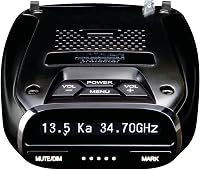
The Uniden R3 has a multicolor OLED display and programmable voice alerts. The Cobra RAD 490i has an LED display, audio warnings, adjustable sensitivity modes, and filtering.
An alert style is personal. Some drivers prefer spoken warnings, while others want to read a display or use a mix of sound and visual cues.
Choose a setup you can understand without taking your attention away from driving.
Set the volume and display preferences while parked. Avoid changing settings on the road, and do not let a detector’s warnings distract you from traffic, road signs, or safe driving.
What mounting and power details should you check?
Check how the detector attaches, where it can sit, and how it gets power before you buy. A mount that blocks your view or a cord that cannot reach a suitable outlet can make the setup awkward.
Compare the mounting method, angle adjustment, cable, and power adapter. Plan a position where you can see the display without obstructing your view or interfering with driving.
The Cobra RAD 490i includes a USB-C power cord, a USB-C to cigarette lighter adapter, and an adjustable adhesive mount. For more placement and bracket advice, see our guide to radar detector mounts and brackets.
Before ordering, check your vehicle’s outlet location and the path the cord will take. After installation, confirm the mount is secure.
Make sure the detector stays in position. If you want a mirror-mounted setup, see how to install a radar detector on the rearview mirror.
Do firmware and camera database updates matter?
Updates matter when they support features you plan to use, such as camera databases, detector firmware, or connected services. Check how updates work and whether the process fits your devices and routine.
The Uniden R3 has free database and firmware updates. Cobra supports ongoing firmware updates, while the Radenso XP can be updated with a Windows or Mac computer.
The Radenso XP also has low-speed muting below a user-selectable speed and automatic sensitivity adjustment based on current speed. It is ready to mount and plug in without changing settings, which suits drivers who want fewer setup decisions.
An update feature does not guarantee that every alert source or camera location will be current. Follow the manufacturer’s instructions for your model and install updates as directed.
Which detector features fit different drivers?
The right feature set depends on your routes and preferences, not the length of a comparison table. Match a product’s specific features to one or two needs you care about most.
- For GPS mute memory and camera alerts: The Uniden R3 has GPS, voice alerts, and a multicolor OLED display.
- For directional information: The Escort MAX 360 MKII has arrows that indicate threats from four directions.
- For adjustable alert behavior: The Cobra RAD 490i offers adjustable sensitivity and filtering modes.
- For GPS lockouts and low-speed muting: The Radenso XP has GPS lockouts and automatic muting below a user-selectable speed.
Choose the R3 if your regular routes make GPS mute memory and camera alerts useful. Choose the MAX 360 MKII if knowing the direction of a threat and using shared alerts matter more to you.
Choose the RAD 490i if you want adjustable alert modes, front and rear laser detection, and included mounting and power accessories. Choose the Radenso XP if you want GPS lockouts, low-speed muting, and a ready-to-use setup.
Skip premium-style extras if you will not use them. A detector with more features can mean more settings and connected options to consider.
A simpler choice may better match a driver who wants straightforward alerts. If you are comparing Uniden models, our Uniden R3 vs R7 comparison can help narrow the choice.
What should you check before using a radar detector?
Check the laws where you will drive and any restrictions that apply to your vehicle before installing a detector. Rules can vary by location and vehicle type, so do not assume a device is allowed everywhere.
Read our guide on how to use a radar detector legally and check local requirements before a trip. Mount the device where it does not obstruct your view, and keep your focus on safe driving.
Once installed, learn the controls while parked. Keep the cable out of your way, and secure the mount.
Avoid reaching for the detector while moving. Treat alerts as information, not instructions to speed or change lanes abruptly.
What are common mistakes when choosing a radar detector?
The most common mistake is choosing by range claims or feature count alone. Those details do not show whether the detector’s alerts, controls, and setup will suit your routes.
Avoid these buying and use errors:
- Ignoring local rules: Check restrictions before buying or using a detector on a trip.
- Buying GPS without a use for it: Location memory helps most when you repeat routes or want camera alerts.
- Assuming laser detection prevents a reading: Detection does not guarantee enough time to respond.
- Choosing a mount without checking placement: Confirm that the detector will not block your view and that power can reach it.
- Changing settings while driving: Set preferences while parked and keep your attention on the road.
- Treating shared alerts as complete coverage: Community reports are an extra input, not a promise that every signal will be reported.
A short checklist can prevent most mismatches: confirm relevant band support, choose the alert style you can understand, plan the mount and power route, and check updates and legal requirements.
How do you choose a radar detector for your needs?
For what to look for in a radar detector, use this decision rule: pick GPS features for repeat routes, adjustable filtering for noisy commutes, and directional arrows if signal direction matters to you. Then check mounting, updates, and local rules before deciding.
The Uniden R3 is the fit for GPS mute memory and camera alerts; the Escort MAX 360 MKII is for directional context and connected alerts. The Cobra RAD 490i fits drivers who want adjustable modes and included setup accessories, while the Radenso XP suits drivers who want GPS lockouts and low-speed muting.
For a broader look at detector features and use in a car, continue with our radar detectors for cars guide.
Frequently asked questions
What matters most when choosing a radar detector?
Start with the signals it supports, then compare filtering, alert clarity, controls and mounting. GPS can help some detectors remember common false alert locations, while shared alerts can add reports from other drivers.
Check local laws and plan to keep your attention on the road.
Is GPS useful in a radar detector?
GPS can help a detector remember locations that trigger recurring false alerts, so you hear fewer repeat warnings on familiar routes. Some detectors also use GPS for camera alerts or route learning.
Check which features the model supports, since GPS functions vary.
Do radar detectors detect laser?
Some radar detectors also detect laser signals, but detection is not the same as protection from a laser speed reading. An alert may come too late to change the reading.
Check which laser features a model supports and follow local laws and safe driving practices.
Should I choose a detector with shared alerts?
Shared alerts may add reports from other drivers, but they depend on a connected service and its coverage. Treat them as an extra source of information, not a guarantee that a road hazard or enforcement signal will be reported.
Compare them with the detector's standalone alert and filtering features.