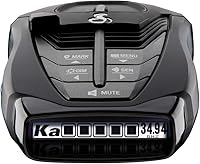
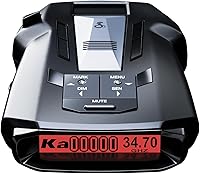
How to Factory Reset a Cobra RAD 480i
You can factory reset a Cobra RAD 480i through the iRadar app, which is where its settings live, and then set your preferences again. The detector has no dedicated reset button, so the app is the practical route for most drivers.
On this page (10 sections)
- Does the Cobra RAD 480i have a reset button?
- How to factory reset a Cobra RAD 480i step by step
- What does a factory reset actually change?
- When should you reset the Cobra RAD 480i?
- What should you set up again after a reset?
- Why won't the iRadar app connect to my RAD 480i?
- Is a reset the same as a firmware update?
- Do you need the app after the reset?
- What should you do if the reset doesn't fix the problem?
- How to reset a Cobra RAD 480i: the short version
A factory reset on the Cobra RAD 480i goes through the iRadar app, because the detector's settings are managed over Bluetooth. Clear the saved settings in the app, then set your preferences again from a clean start.
The detector itself has no reset button to press.
That matters if you bought the detector used or changed a lot of settings and lost track. This guide walks through the reset, what happens to your data and what to set up again afterward.
Does the Cobra RAD 480i have a reset button?
No, the RAD 480i has no dedicated reset button. Its settings live in the iRadar app, so the app is where you clear them.
The detector's own controls handle volume and basic mute functions, not a full settings wipe.
The RAD 480i connects to the iRadar app over Bluetooth, and that connection is what makes a factory reset possible. If the app has never been paired to the detector, there are no saved settings to clear on the detector side.
Some drivers expect a pinhole button like on a router. The RAD 480i doesn't have one, and pressing or poking at the case won't reset it.
The app is the only practical route, so keep your phone handy before you start.
How to factory reset a Cobra RAD 480i step by step
Open the iRadar app, connect to the detector, and clear its saved settings. Then pair again and set your preferences from scratch.
The steps below follow that order.
- Park somewhere safe and keep the detector powered on with the 12V cord.
- Open the iRadar app and let it find the RAD 480i over Bluetooth.
- Go into the detector settings in the app and clear or restore them to defaults.
- Forget the detector in your phone's Bluetooth list, then pair it again.
- Set your preferences: alert volume, display brightness and filter choices.
- Take a short drive to confirm the alerts and display behave as expected.
The exact menu labels shift between app versions, so look for the settings area tied to your paired detector. If the app won't connect, restart the app and the detector before trying again.
What to check before you clear the settings
Before clearing anything, note the settings you want to keep, such as your preferred alert volume or display brightness. A reset returns the detector to defaults, so anything you changed is gone.
If the detector is paired to a shared family account, check with the other drivers first. A reset in the app changes what everyone sees when they connect.
You don't need to unplug the detector for an app-based reset. Leave it on the windshield mount with the power cord connected so the Bluetooth link stays alive during the process.
How to clear the settings without the app
If the app won't cooperate, remove the detector from the phone's Bluetooth list and reconnect. That clears the saved pairing, though it doesn't wipe every preference.
Some app versions offer a reset option under the account or device menu. Look for wording like "restore defaults" or "reset device" before assuming the app can't do it.
Avoid guessing at menu paths you haven't seen; a wrong tap in the wrong screen does nothing useful.
If the detector behaves oddly after a reset, unplug the 12V cord for a moment and plug it back in. That power cycle clears temporary glitches the settings change might have caused.
What does a factory reset actually change?
A reset returns the detector's settings to the factory defaults, so your custom volume, brightness and filter choices are replaced. It doesn't change the hardware or erase your iRadar account.
The RAD 480i relies on its next generation IVT Filter and anti-falsing circuitry to cut false alerts from blind spot monitoring and other driver-assist systems. If you tuned those filters to your taste, a reset brings them back to the factory setup.
Your saved alerts and community data stay in the app account. The reset only touches the detector's settings, not your login or your route history.
That's a useful split if you want a clean detector without losing your account.
When should you reset the Cobra RAD 480i?
Reset when settings are tangled or the detector behaves unpredictably, not as a first step for every problem. A reset is a clean slate, and it's worth trying when you've lost track of what changed.
Good times to reset include after buying a used unit, after letting someone else drive with your detector, or after a firmware update changes how the menus look. A reset gives you a known starting point to set up from.
Skip the reset for weak detection or missed alerts. Those usually trace back to mounting, power or the detector's position on the windshield.
Our Cobra RAD 480i review covers how the LaserEye front and rear detection and Digital Signal Processing are meant to perform.
What should you set up again after a reset?
Set your alert volume, display brightness and filter preferences first, then pair the app and check the shared alerts. Those are the settings most drivers notice day to day.
The RAD 480i uses an OLED display, so brightness matters for daytime readability. Set a level you can see in sun without glaring at night.
Adjust the alert volume before your first drive, since a quiet detector is easy to ignore.
The app adds Apple CarPlay and Android Auto compatibility so you can view alerts on your vehicle's display. Check that connection after the reset if you rely on it.
Our comparison of the Cobra RAD 480i vs RAD 490i covers how the two models handle app features differently.
Why won't the iRadar app connect to my RAD 480i?
The usual causes are Bluetooth being off, the app lacking permission, or the detector not being powered. Work through those before assuming the detector is broken.
Check that Bluetooth is on and the app has permission to use it. Make sure the 12V cord is seated and the detector has power.
Then forget the detector in your phone's Bluetooth list and pair it fresh.
Keep the phone close during pairing. Other Bluetooth devices in the car can crowd the connection, so try pairing in a quiet spot away from a busy parking lot.
If the app still won't connect, close it fully and reopen it. A detector that powers on and shows its display is usually fine; the problem is more often the phone side of the link.
Is a reset the same as a firmware update?
No, a reset clears settings while a firmware update changes the detector's software. The RAD 480i has an updateable IVT Filter, and updates come through the app, not from a reset.
An update can improve how the filter handles false alerts. A reset only puts your settings back to defaults.
If you updated recently and the menus look different, a reset can help you relearn the layout.
Do the update first if one is available, then reset and set up your preferences. That order avoids setting everything twice.
Do you need the app after the reset?
You don't need the app to drive with the detector, but you do need it for a full reset and for shared alerts. The RAD 480i works on its own with the included 12V power cord and windshield mount.
The app adds live alerts from other drivers through the Drive Smarter community and camera notifications. Without it, the detector still detects radar and laser signals.
With it, you get the shared-alert layer.
If you'd rather skip the app entirely, the detector still runs. Just know that resetting later means using the app again.
Our Cobra RAD 480i vs RAD 700i comparison shows how app features differ between the two.
What should you do if the reset doesn't fix the problem?
Check the power cord, the mount and the windshield position before deciding the detector is faulty. A reset fixes settings problems, not hardware or placement issues.
Make sure the suction cup mount holds the detector level and clear of tint or stickers. A loose mount or a blocked lens can hurt detection more than a settings glitch.
Reposition and retest on a known alert before you reset again.
If the detector still won't power on or behave, a Cobra RAD 350 laser radar detector review shows what a simpler model offers if you want to compare before replacing it. A dead unit is a warranty question, so check the one-year limited manufacturer's warranty that Cobra backs the RAD 480i with.
How to reset a Cobra RAD 480i: the short version
For most drivers, the app reset is the whole job. Open iRadar, clear the detector's saved settings, pair again and set your preferences.
Then drive once to confirm everything works.
Choose the app route first, since the RAD 480i has no reset button. If the app won't connect, fix the Bluetooth pairing before trying anything else.
Save a reset for settings problems, and check mounting and power for detection complaints.
If you want to know how to factory reset a Cobra RAD 480i without the app, the honest answer is that the app is the intended route. A power cycle clears glitches but not saved settings.
Plan on the app for a true reset, and keep your phone charged on the day you do it.
Frequently asked questions
Does resetting the RAD 480i delete my saved alerts?
Your saved alerts and account data live in the iRadar app, not on the detector. Clearing the detector's settings doesn't wipe your account.
Check the app's own settings if you want to clear saved routes or alert history separately.
Will a factory reset make the RAD 480i detect better?
No. A reset only returns settings to defaults.
It doesn't change the hardware, the antenna or the LaserEye sensors.
If detection feels weak, check the mounting position, the power cord and the windshield before you reset anything.
Do I need the app to use the RAD 480i?
No. The detector runs on its own with the included 12V power cord.
The app adds shared alerts, camera notifications and settings control.
Without it you can still drive with the detector, but you'll need the app for a full factory reset.