Radar Detectors for Cars: A Plain-English Guide
Radar detectors for cars alert you to some police radar signals. Choose one for the alerts and controls that suit your routes, then use it as a source of awareness, not a guarantee or a reason to speed.
On this page (8 sections)
- What do radar detectors for cars detect?
- How do you choose radar detectors for cars?
- Which radar detector fits each kind of driver?
- How should you install and set up a car radar detector?
- How do you reduce false alerts without missing useful ones?
- Are radar detectors legal where you drive?
- Which detector fits your priorities?
- What should you remember about radar detectors for cars?
Radar detectors for cars alert you to some radar signals used in speed enforcement, giving you another source of information as you drive. They cannot prevent a ticket, guarantee advance warning or detect every enforcement method.
Choose by the information you want while driving: alerts by band, GPS memory for recurring signals, arrows for direction, or phone connections for shared alerts and updates. A feature-rich detector only helps if you can understand its warnings without looking away from traffic.
If you want a quick explanation of the device itself, start with what a radar detector does. This guide explains the alert types, how to compare models, how to set one up and how to decide whether a detector fits your driving.
What do radar detectors for cars detect?
Radar detectors for cars listen for radio signals in supported bands and alert when they detect a signal. That alert is a prompt to stay aware, not proof that police are tracking your vehicle or that a particular action is needed.
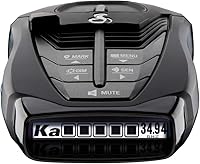
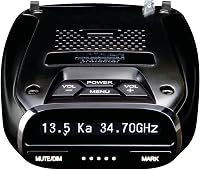
Different models support different bands and alert features. The Uniden R7 supports K and Ka bands, while the Cobra RAD 700i supports X, K and Ka bands.
Some detectors also report laser signals or fixed camera locations. Those are separate capabilities, and neither one stops an enforcement device or guarantees that an alert will arrive in time.
Check the capabilities of the exact model you are considering. A detector's name or advertised range does not tell you which alerts it handles, how it filters signals, or whether its controls fit your routine.
What does a radar detector alert mean?
A radar alert means the device has picked up a signal in one of its supported bands. The source might be enforcement equipment, another signal source or a vehicle system that creates interference.
The band and signal-strength information can help you interpret an alert, but it does not identify the source with certainty. Learn the differences in our K band vs Ka band guide.
Pay attention to how a detector presents alerts. A clear voice warning, readable display or directional arrow may help you understand a signal with less effort, but no display removes the need to watch the road.
Does a radar detector find every kind of speed enforcement?
No. A radar detector only alerts to signals and features it can detect.
Enforcement methods vary, and a quiet detector does not confirm that there is no enforcement nearby.
Some speed enforcement uses laser, also called lidar. A laser alert may arrive only after an officer has aimed at your vehicle, so it should not be treated as a dependable early warning.
Read whether radar detectors pick up lidar guns for a closer look at the difference between radar and laser alerts. The key buying point is to check each model's capabilities while keeping expectations realistic.
How do you choose radar detectors for cars?
Choose a detector by matching its alerts and controls to your routes, rather than by comparing a single range claim. Think about the signals you want to know about, how much filtering you need, what information you can read quickly and whether you will use connected features.
Before comparing models, write down your main driving pattern. A daily commute past the same shops creates a different alert problem from long trips on unfamiliar roads, while a driver who wants direction information may prefer a model with arrows.
These are the practical questions to answer:
- Do you want GPS memory to reduce repeat alerts at familiar locations?
- Would directional arrows help you interpret where a signal is coming from?
- Do you want fixed camera alerts, and are those included on the models you are comparing?
- Will you use a phone app, shared alerts, CarPlay or Android Auto compatibility, or Wi-Fi updates?
- Can you mount and power the unit safely in your car?
- Have you checked the rules for the places and vehicle types relevant to your driving?
Our guide to what to look for in a radar detector expands on these trade-offs. Use it as a checklist, then narrow your options to the features you will actually use.
Is long range the most important feature?
Range matters to drivers who want more notice, but it is not the only reason one detector may suit you better than another. Filtering, clear alerts, useful controls and the ability to install the unit properly also shape the experience.
A detector that produces frequent alerts you cannot interpret may distract you. A model with features you will not use may also add setup and menu choices without improving your daily routine.
Treat performance language as a reason to compare the model's complete feature set, not as a promise about how much warning you will receive on a particular road. Traffic, terrain, signal conditions and the way equipment is used can all affect what a detector alerts to.
Do you need GPS memory?
GPS memory can help reduce repeated alerts at locations where the same false signal appears. It is useful when you drive a regular route and encounter recurring sources such as automatic doors or vehicle systems.
The Uniden R7 and R3 can remember and mute common false-alert locations along regular routes. The Cobra RAD 700i and Escort MAX 360c MKII describe GPS-based AutoLearn features that learn to reject false-alert locations over time.
GPS memory is less compelling if you drive mostly unfamiliar routes or prefer to assess every alert yourself. It also should not be used to assume that every alert at a familiar location is harmless, since conditions can change.
Are arrows worth choosing?
Directional arrows can add context by showing the direction associated with a signal. They may help drivers who want to distinguish a signal detected ahead, behind or from the side, depending on the model's design.
The R7 uses dual antennas and directional arrows, and the Escort MAX 360c MKII also includes arrows. The R3 does not have directional arrows.
Arrows do not identify a police vehicle or tell you what to do. Choose them if the extra direction information is useful to you, and skip them if a simpler display is easier to understand.
Do phone connections and shared alerts matter?
Connected features are useful if you will use the companion app, community alerts, in-car display compatibility or remote updates. If you do not want to connect a phone or manage another app, these features may not affect your decision.
The Cobra RAD 700i supports Drive Smarter shared alerts and Apple CarPlay and Android Auto compatibility. The Escort MAX 360c MKII supports shared alerts and dual-band Wi-Fi for over-the-air software updates.
Check which connected features are available on the model you are considering and what setup they require. Keep the detector useful on its own, because phone access or community alerts should not replace attention to road conditions.
Which radar detector fits each kind of driver?
The right radar detector depends on which feature solves a real problem for you. The Uniden R7 suits drivers who want arrows and GPS memory, the R3 suits drivers who want GPS memory and voice alerts without arrows, and the connected Cobra and Escort models suit drivers interested in app-based features.
Who should choose the Uniden R7?
Choose the Uniden R7 if you want directional arrows, dual antennas and GPS mute memory in one detector. Its large multi-color OLED display can show up to four signals at once, which may suit drivers who value seeing several pieces of alert information together.
The R7 supports K and Ka bands and includes preloaded red-light and speed-camera locations. Uniden also describes free database and firmware updates for those camera alerts.
Skip it if arrows, a multi-signal display or camera-location alerts do not matter to you. The R3 also has GPS memory and voice alerts, and may suit you better if those are the features you care about.
Who should choose the Uniden R3?
Choose the Uniden R3 if you want GPS mute memory, voice alerts and a multi-color OLED display without directional arrows. Its voice warnings can be programmed to fit your preferences, which may help you stay focused on the road instead of reading each alert.
The R3 includes preloaded red-light and speed-camera alerts, with free database and firmware updates. That combination makes it a practical choice for drivers who want familiar-route filtering and spoken warnings.
Skip it if direction information is a priority. The R7 and Escort MAX 360c MKII include arrows, so compare those if you want a visual cue about where a signal is coming from.
Who should choose the Cobra RAD 700i?
Choose the Cobra RAD 700i if you want GPS-based AutoLearn, front and rear detection, and connected alerts through Drive Smarter. Its five-color OLED display lets you customize the display colors, and the model supports Apple CarPlay and Android Auto compatibility.
Cobra describes its AutoLearn feature as recognizing and reducing false signals over time. This may appeal to a driver who repeats familiar routes and wants a connected detector that can use shared alerts.
Skip it if you do not plan to use Drive Smarter or in-car compatibility, or if you specifically want directional arrows. The Cobra's described features include front and rear detection, but the R7 and Escort are the options here that add arrows.
Who should choose the Escort MAX 360c MKII?
Choose the Escort MAX 360c MKII if you want directional arrows alongside connected features. It combines GPS-based AutoLearn, shared alerts, dual-band Wi-Fi updates and Apple CarPlay and Android Auto compatibility.
The model's dual antennas and arrows are designed to detect signals from four directions and show direction. Escort also describes filtering aimed at reducing false alerts from collision-avoidance and blind-spot monitoring systems.
Skip it if you will not use the app, shared alerts or Wi-Fi updates, or if you would rather keep setup simple. The R7 also includes arrows and GPS memory, while the R3 gives you GPS memory and voice alerts with fewer connected features.
How should you install and set up a car radar detector?
Install a detector where it has a clear view through the windshield without blocking your view of the road. Follow the device instructions and local rules for mounting, and keep any power cord away from airbags, controls and places where it could snag.
A basic setup should take account of both visibility and safe access. Put the display where you can glance at it briefly, but do not mount it where it hides the road or forces you to lean or turn to read alerts.
Before attaching a mount, check how it holds the unit and whether it remains secure in your vehicle. Confirm that the detector can be reached for adjustments while parked, not while you are driving.
Most of the models discussed here use vehicle power. Check the exact power method and compatibility before buying a hardwire kit or planning a permanent installation.
Our guide to installing a radar detector covers placement and setup considerations. If you plan to mount a detector from the rearview mirror, see how to install a radar detector on the rearview mirror.
What should you check before the first drive?
Set up the detector while parked. Read the controls and alert display, select settings you understand, and confirm that the unit powers on reliably before relying on it during a drive.
If the model uses GPS memory, learn how to mark or mute a location and how to undo that setting. A saved mute can make a familiar route quieter, but you should know which locations you changed and how to restore alerts.
If you plan to use a phone app or shared alerts, pair devices and review permissions while parked. Make sure the detector still gives alerts in a way you can understand if the phone is not connected.
For camera alerts or software updates, review the manufacturer’s instructions for the model. Do not assume that a database or firmware update happens automatically unless you have confirmed how that feature works.
How can you keep setup from distracting you?
Choose a display and alert style you can understand at a glance. Voice alerts may help when you do not want to read a screen, while arrows or multiple signal details can offer more context if you can absorb it without distraction.
Do not change settings while moving. If an alert seems confusing or a setting needs attention, wait until you can pull over safely or reach your destination.
Keep alert volume useful but not startling. A warning that is too loud can disrupt your focus, while one that is inaudible cannot help you notice a signal.
How do you reduce false alerts without missing useful ones?
Use filtering to manage repeat signals gradually, not to silence every alert that seems inconvenient. GPS memory and automatic filtering can make regular routes quieter, but they cannot classify every signal perfectly.
Start with the default settings and observe where alerts recur. If the detector supports a saved-location mute, use it only after you understand the location and know how to remove the mute if it no longer makes sense.
Avoid reducing sensitivity or disabling a band simply because it produces alerts. Such a change can also remove alerts you wanted to receive, and the right settings depend on the detector and where you drive.
Treat unusual alerts with care, including alerts on a familiar route. A repeated location can have changing conditions, so use the detector as one input alongside road signs, speed limits and traffic.
What common mistakes should you avoid?
The most common mistakes are expecting a guarantee, placing the device poorly, muting alerts too broadly and trying to interact with the detector while driving. Each can reduce the value of the information it provides or create a distraction.
Avoid these habits:
- Buying by range language alone. Compare alert types, filtering, display and controls alongside performance claims.
- Assuming a radar alert proves enforcement is aimed at you. A signal may come from another source.
- Treating a quiet detector as proof the road is clear. The device cannot detect every enforcement method or situation.
- Assuming laser detection guarantees advance warning. A laser alert can come after an officer has aimed at your vehicle.
- Saving mutes without tracking them. You may later forget why a location is quiet or how to restore alerts.
- Mounting where the unit blocks your view. Alert access should not come at the cost of a clear view of traffic.
- Adjusting the device or phone while moving. Set up features while parked and keep your attention on driving.
- Ignoring local rules. A detector's feature set does not mean its use or mounting is allowed where you are.
For legal considerations, read how to use a radar detector legally and check current official rules for each place you drive. Our separate guide explains where radar detectors are illegal.
Are radar detectors legal where you drive?
Radar-detector rules depend on where you drive and the type of vehicle. Check current official rules for the places on your route, including restrictions that may apply to commercial vehicles or windshield-mounted devices.
Do not rely on a detector's features as evidence that it is legal to use. Rules can change, and a device that is acceptable in one place may be restricted in another.
Read our guide on how to use a radar detector legally and verify the rules that apply to your situation before installing or using one. Keep the detector's placement within any applicable visibility and mounting requirements.
Which detector fits your priorities?
The Uniden R7 ranks first among these four detectors with a score of 9. Match its features, or those of another pick, to the information you want while driving.
- Uniden R7, score 9: GPS mute memory, K and Ka support, dual antennas and directional arrows.
- Uniden R3, score 8.8: GPS mute memory and voice alerts in a model without directional arrows.
- Cobra RAD 700i, score 8.6: GPS-based AutoLearn, front and rear detection, and shared alerts through Drive Smarter.
- Escort MAX 360c MKII, score 8.5: Directional arrows, GPS-based AutoLearn, shared alerts and dual-band Wi-Fi updates.
Use those differences to narrow your choice, not as a claim that one model suits every car or route. If a feature will not change how you understand alerts, it should carry less weight in your decision.
What should you remember about radar detectors for cars?
Radar detectors for cars can alert you to certain signals, but they are one source of driving information, not a guarantee. Pick the Uniden R7 if arrows and GPS memory matter, the R3 if you want GPS memory and voice alerts without arrows, the Cobra RAD 700i if you want connected shared alerts, or the Escort MAX 360c MKII if you want arrows and connected features together.
Mount the detector so it does not block your view, learn its controls while parked, and use filtering with care. Keep your attention on traffic, follow posted limits and check the rules where you drive; for a feature checklist before you buy, see what to look for in a radar detector.
Frequently asked questions
What do radar detectors for cars do?
Radar detectors listen for certain radar signals and alert you when they detect one. An alert can add awareness, but it does not identify every enforcement method, guarantee advance warning or make speeding safe.
Learn what each band alert means and follow posted limits.
Can a radar detector detect a laser speed gun?
Some detectors include laser detection, but an alert may arrive only after an officer has aimed at your vehicle. A detector cannot promise advance notice or block a laser reading.
Check the model's stated capabilities and treat any alert as a reason to drive carefully.
Are radar detectors legal in every state?
No. Rules can vary by location and vehicle type, and federal restrictions apply to commercial vehicles in some circumstances.
Check current official rules for every place you drive before using one.
Our guide to where radar detectors are illegal is a starting point.
Where should you mount a car radar detector?
Mount a detector where it has a clear view through the windshield and does not block your view of the road. Follow the device instructions and check local rules about windshield mounts.
Keep cords clear of controls, airbags and your line of sight.
Do GPS features reduce false alerts?
GPS features can remember locations where alerts repeat and help mute them on later drives, depending on the model. They do not identify every false signal or confirm that an alert is harmless.
Keep your attention on the road and use the detector's settings with care.