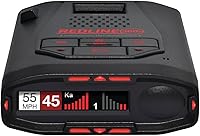
Uniden R3 vs R7: Which Is Better? (October 2026)
Choose the Uniden R7 if you want directional arrows and dual antennas; choose the R3 if GPS mute memory, camera alerts and voice warnings cover your needs. Both have an OLED display and GPS features.
On this page (10 sections)
- Uniden R3 vs R7: what is the key difference?
- Which model gives you directional information?
- How do GPS and false alert features compare?
- What can you see and hear on each detector?
- Who should choose the Uniden R7?
- Who should choose the Uniden R3?
- How should you set up and use either model?
- What mistakes should you avoid?
- Is the Uniden DFR7 worth considering?
- How should you decide between the Uniden R3 and R7?
For the Uniden R3 vs R7 decision, choose the R7 if directional arrows and dual antennas matter to you; choose the R3 if GPS mute memory, camera alerts and voice warnings are enough. Both models have an OLED display and GPS features for handling repeat alerts.
The R7 gives you direction, band and signal strength information for alerts, and it can show up to 4 signals at once. The R3 keeps the focus on core alerts, including GPS mute memory and warnings for red light and speed camera locations.


Uniden R3 vs R7: what is the key difference?
The R7 adds directional arrows and dual antennas; the R3 offers core GPS, voice and camera alerts without those directional features. If you want to understand which way a signal is coming from, the R7 is the clear choice.
The R7 uses front and rear antennas, and its arrows indicate the direction of a threat. Its multi-color OLED display can show the band and signal strength for each alert, with room for up to 4 signals at once.
The R3 also has a multi-color OLED display, voice alerts and GPS mute memory. It can alert you to preloaded red light and speed camera locations, but its listed features do not include directional arrows or a dual-antenna design.
Both models can remember and mute common false alerts along routes you drive regularly. For a plain-language overview of what detectors do and the alerts they provide, read what a radar detector does.
Which model gives you directional information?
Choose the R7 if you want arrows to show the direction of a threat. That extra context is useful when you want to interpret an alert while driving.
The R7's dual antennas cover front and rear, and the arrows help identify the direction associated with a threat. The display also shows its band and signal strength, which gives you more information than an alert alone.
The R3's listed features do not include directional arrows or dual antennas. It can suit drivers who want GPS mute memory, voice warnings and camera alerts, without prioritizing directional detail.
Think about how you plan to use the information. If the arrow is something you would check to make sense of an alert, the R7's additional detail fits that preference.
If you would rather hear a warning and keep your focus on the road, the R3's voice alerts may be a better match.
Neither model should be treated as permission to drive faster or as a guarantee that every threat will be detected with useful advance notice. A detector is one source of information, and your speed, attention and local rules still matter.
How do GPS and false alert features compare?
Both models use GPS to remember and mute common false alerts, and both include red light and speed camera alerts. These shared features are useful for daily routes, but they don't separate the R3 from the R7.
GPS mute memory can reduce repeat alerts from familiar sources, such as automatic doors at retail stores. The R3 and R7 can remember common false alert locations along routes you regularly drive.
Both models also include preloaded red light and speed camera locations, with free database and firmware updates. Their GPS functions can also let you mark locations where you commonly encounter radar transmissions, so you can receive a user mark warning when you approach them.
This feature is most useful if you drive the same roads often. A location you marked or a saved false alert can help make familiar drives less noisy, but it does not replace attention to signs, signals or changing road conditions.
If alerts seem unfamiliar, learn what their bands mean before changing settings. Our guide to K band vs Ka band alerts explains the difference in plain language.
What can you see and hear on each detector?
Both models use an OLED display and voice alerts, while the R7 is specified to show up to 4 signals at once. Choose the R7 if you value seeing several alerts and their details together.
The R7's large multi-color OLED display can show the band and signal strength for each threat. Seeing multiple signals at once may help you keep track when more than one alert is present.
The R3 has a multi-color OLED display, but no simultaneous signal count is specified for it. That makes the R7 the more clearly documented choice if seeing several signals together is important to you.
Voice alerts on both models can provide warnings without requiring you to read every screen detail. Set the alert options to a level you can understand without distraction, and keep your eyes on the road rather than trying to study the display while moving.
Who should choose the Uniden R7?
The R7 suits drivers who want directional context, front and rear antennas, and multiple alerts visible together. It makes sense when those details will help you interpret warnings on your routes.
Choose the R7 if you want to know the direction associated with a threat rather than receiving only a general alert. Its arrows, dual antennas and display information are the main reasons to step up from the R3.
It can also fit drivers who often encounter several signals and want to see up to 4 at a time. The extra screen detail is useful only if you have a safe moment to glance at it, so voice alerts remain important for keeping your attention on driving.
Skip the R7 if you don't expect to use directional arrows or multiple signal information. If your priority is GPS mute memory, camera alerts and voice warnings, the R3 already covers those needs.
The R7's additional features do not make it a substitute for safe driving or local legal guidance. Before buying or using any detector, check where radar detectors are illegal for the rules that apply to your travel.
Who should choose the Uniden R3?
The R3 fits drivers who want GPS mute memory, camera alerts, voice warnings and an OLED screen without prioritizing arrows. It is the simpler match when those core functions describe what you need.
Choose the R3 if you regularly travel familiar routes and want the detector to remember common false alerts. Its GPS features and camera alerts can make it a practical option for drivers who want route-aware warnings.
The R3 also makes sense if you prefer voice warnings and don't need to see the direction of every threat. Its features do not include directional arrows, so choose it with that tradeoff in mind.
Skip the R3 if knowing a threat's direction is a key part of how you would use a detector. The R7's arrows and dual antennas directly address that preference.
When comparing the R3 with other models, separate shared features from the ones that change your daily use. Our Uniden R4W vs R7 comparison covers another Uniden choice if you're considering options beyond these two.
How should you set up and use either model?
Start with a safe mounting position, learn the controls before driving, and use GPS features on familiar routes. A calm setup helps you avoid handling the detector or studying its screen while the car is moving.
Mount the detector where it has a clear view through the windshield and where it does not block your view of the road. Keep cords secured so they don't interfere with steering, pedals or other controls.
Before setting off, review the manual and choose alert and display settings while parked. Learn how to adjust volume, mute an alert and use GPS options before you need to make those changes in traffic.
On a familiar route, give GPS mute memory time to learn or mark the locations you want remembered. If you move the detector to another vehicle or change how you drive, revisit the saved locations and settings so they still fit your routine.
Database and firmware updates can keep camera and detector information current. Use Uniden's update instructions and a suitable power connection.
Avoid interrupting an update once it begins. For a step-by-step starting point, see how to update a Uniden radar detector.
What mistakes should you avoid?
The most common mistake is expecting a detector to replace attention, judgment or legal research. Treat alerts as information that supports careful driving, not as a guarantee or a license to speed.
Don't buy the R7 for its arrows if you won't use directional information. The R3 shares GPS mute memory, camera alerts, voice warnings and an OLED display, so those features alone don't require choosing the R7.
Don't assume the R3 has directional arrows or front and rear antennas. Those features distinguish the R7 in this comparison, and the R3's listed features don't include them.
Don't rely on camera alerts as a complete record of every location or as a replacement for posted signs. Keep your attention on the road and follow the traffic rules even when the detector is quiet.
Finally, don't make settings changes while driving. Set up the screen and alerts while parked, then use voice warnings and brief glances rather than trying to read detailed information in motion.
Is the Uniden DFR7 worth considering?
The DFR7 is another option if GPS mute memory, voice alerts and K/KA filtering are priorities. It does not have directional arrows among its listed features, so the R3 and R7 remain the direct comparison for this decision.
The DFR7's OLED display shows radar band frequency, numeric signal strength, maximum speed warning and vehicle battery voltage. Its advanced K/KA filtering can help avoid false alerts from blind spot monitoring and collision avoidance systems in other vehicles.
Consider it if those filtering and display details match your needs. If your decision depends on directional arrows and dual antennas, compare the R7 directly with the R3 instead.
How should you decide between the Uniden R3 and R7?
Pick the R7 for directional arrows, dual antennas and a multi-signal display; pick the R3 for GPS mute memory, camera alerts and voice warnings without directional details. The right model is the one whose difference you will actually use.
Choose the R7 if you want to know the direction of a threat and see more than one signal on the display. Choose the R3 if the shared GPS and camera features matter more than arrows.
If neither choice feels clear, list the features you expect to use on your regular routes. For broader guidance on detector features, read what to look for in a radar detector.
For more on Uniden's approach to its higher-end features, see our Uniden R8W review. The short version remains simple: R7 for directional information, R3 for core GPS alerts.
Frequently asked questions
What is the main difference between the Uniden R3 and R7?
The R7 adds dual antennas and directional arrows that show which direction a threat is coming from. The R3 shares core features such as GPS mute memory, voice alerts, an OLED display and red light and speed camera alerts, but directional arrows are not among its features.
Does the Uniden R3 have GPS mute memory?
Yes. The R3 uses GPS to remember and mute common false alerts along routes you drive regularly.
It also includes red light and speed camera alerts, so the main choice between it and the R7 is whether directional arrows and dual antennas matter to you.
Does the Uniden R7 show where an alert is coming from?
Yes. The R7's directional arrows display the direction of a threat, and its dual antennas cover front and rear.
The display can also show the band and signal strength for each alert, with up to 4 signals shown at once.
Should I choose the Uniden R3 or R7?
Choose the R7 if you want directional arrows, dual antennas and a display that can show multiple signals at once. Choose the R3 if GPS mute memory, camera alerts, voice warnings and an OLED display cover what you need without the added directional details.
Can a radar detector detect every laser alert in time?
A detector can alert to laser, but an alert does not guarantee useful advance notice. Read what radar detectors can and cannot do with lidar and follow local laws and safe driving practices.