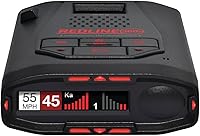
Uniden R4W vs R7: Which Is Better? (October 2026)
Choose the Uniden R7 for directional arrows and a multi-signal display; choose the R4W for Wi-Fi, Bluetooth, R/TACH app support and advanced K/Ka filtering. Both have GPS, voice alerts, an OLED display, and red-light and speed-camera features.
On this page (9 sections)
- Uniden R4W vs R7: what is the main difference?
- Who should choose the R7 for directional alerts?
- Who should choose the R4W's connected features?
- How do GPS and false-alert controls compare?
- Which model has camera and voice alerts?
- What should you consider before setup?
- What common buying and use mistakes should you avoid?
- What does each detector suit, and who should skip it?
- Uniden R4W vs R7: which should you choose?
The Uniden R4W vs R7 choice comes down to connected features or directional information. Choose the R7 if you want arrows to show where an alert is coming from and a display that can show up to 4 signals; choose the R4W if Wi-Fi, Bluetooth, R/TACH app support and advanced K/Ka filtering matter more.
Both models include GPS features for remembering and muting common false alerts, voice alerts, an OLED display, and red-light and speed-camera features. They serve different priorities, so start with the features you expect to use on your regular routes.
The R8W is another option if you want both arrows and phone connectivity. It includes dual antennas, directional arrows, Wi-Fi, Bluetooth, GPS and R/TACH app support.


Uniden R4W vs R7: what is the main difference?
The R7 gives you directional arrows and a display that can show multiple signals; the R4W adds Wi-Fi, Bluetooth, R/TACH app support and advanced K/Ka filtering. Both have GPS, voice alerts and camera-alert features.
The R7's dual antennas detect threats from the front and rear. Its arrows show the direction of a detected threat, and its multi-color OLED display can show up to 4 signals with their band and signal strength.
The R4W uses a color OLED display and includes built-in GPS, Wi-Fi, Bluetooth and R/TACH app support. Its advanced K/Ka band filtering is designed to reduce alerts from blind-spot monitoring and collision-avoidance systems.
Directional arrows aren't among the R4W's stated features. If you want a visual cue about a signal's direction, the R7 is the clear fit; if you value the R4W's connection options, its feature set is more relevant.
| Product | Best for | Antennas | Display | Connectivity | Our score |
|---|---|---|---|---|---|
| Uniden R8W | arrows and apps | Dual | OLED | Wi-Fi, Bluetooth, R/TACH app support | 9.2 |
| Uniden R7 | threat direction | Dual, front and rear | Multi-color OLED | Built-in GPS | 9.0 |
| Uniden R4W | phone connections | Not specified | Color OLED | Wi-Fi, Bluetooth, R/TACH app support | 8.7 |
Who should choose the R7 for directional alerts?
Choose the R7 if knowing the reported direction of a detected threat is a priority. Its front and rear antennas and on-screen arrows help you interpret alerts while driving.
The display can show band and signal strength for each alert, with room for up to 4 signals at once. That view may suit drivers who want more alert details on the screen, especially on routes where they encounter several signal sources.
The R4W has a color OLED display, but its stated features don't include directional arrows or a signal count. It remains a reasonable choice if you don't need those cues and care more about its phone connections or filtering features.
Neither detector makes driving decisions for you. Keep your eyes on the road, respond to the conditions around you and follow posted limits.
Is the Uniden R7's arrow display useful?
The arrows give you a cue about the reported direction of a detected threat. They don't tell you what action to take or replace checking traffic and road conditions.
If you want directional arrows with phone connectivity, see the Uniden R8W versus Valentine One Gen 2 comparison. The R8W has dual antennas and directional arrows, plus Wi-Fi, Bluetooth and R/TACH app support.
Who should choose the R4W's connected features?
Choose the R4W if you want built-in Wi-Fi, Bluetooth and R/TACH app support. Those features sit alongside GPS, voice alerts and its color OLED display.
The R7's stated features focus on detection, GPS, its display and camera alerts. Wi-Fi, Bluetooth and app support aren't among them, so the R7 isn't the direct match if those connections are central to your decision.
Before you buy, decide what you expect the phone connection to do for you. R/TACH app support is included on the R4W, but the specific app functions and phone-based alert workflow aren't specified.
Both models have voice alerts, so you can receive spoken information without relying only on the screen. The R4W's voice alerts are programmable, while the R7's notifications can identify the type of radar alert.
How do GPS and false-alert controls compare?
Both models can use GPS to remember and mute common false alerts along your routes. That can help reduce repeat alerts from sources such as automatic doors at retail stores.
The R7 can also store user-marked points. Its voice alert can announce a mark ahead and identify the type of alert as you approach.
The R4W includes Auto Learn, which Uniden says reduces false alerts over time. Its advanced K/Ka filtering is designed to limit alerts from blind-spot monitoring and collision-avoidance systems.
These controls depend on your routes and settings, so they don't promise a silent drive. Read the manual before changing filters, muting alerts or saving locations, and make sure any changes suit the way you drive.
To understand the signal names behind common alerts, read what K band and Ka band mean. If detector alerts are new to you, what a radar detector does explains their purpose and limits.
Which model has camera and voice alerts?
Both include red-light and speed-camera features, plus voice alerts. The R7 has preloaded camera locations and free database and firmware updates; the R4W includes a speed and red-light database.
The R7's voice notifications can identify the type of radar alert. The R4W's voice alerts are programmable, which lets you adjust them to your preferences.
Treat camera alerts as an added cue, not a replacement for road signs or attention to your surroundings. Locations and alert behavior can vary, so keep watching the road and checking the rules where you drive.
The guide to using a radar detector legally can help you check the rules that apply to your area. Using either model doesn't change your responsibility to drive safely.
What should you consider before setup?
Plan the detector's position, power and alert settings before your first drive. Both models are windshield-mount detectors powered from a vehicle's 12-volt supply.
Follow the manual for mounting and power connections, and position the unit so it doesn't block your view. If you want a more detailed installation walkthrough, see how to install a radar detector.
After installation, learn the display and voice alerts while parked. Adjust the alert volume and available settings before driving, then use GPS memory and filtering in a way that makes sense for your routes.
Keep firmware and camera database information current according to Uniden's instructions. The R7 includes free database and firmware updates, and the R4W includes a speed and red-light database with updates.
What common buying and use mistakes should you avoid?
Don't choose by a single shared feature such as GPS or voice alerts. Both models offer those, so they won't tell you which one better fits your priorities.
A common mistake is buying the R4W while expecting arrows to show threat direction. Its stated features don't include them; select the R7 if that visual cue matters.
Another is choosing the R7 for phone connectivity. Wi-Fi, Bluetooth and R/TACH app support are stated for the R4W, not the R7, so check that distinction before you decide.
Don't expect GPS memory or filtering to remove every alert. Settings can affect what you hear, and alerts still require your attention and judgment.
What does each detector suit, and who should skip it?
The R7 suits drivers who value directional arrows and a multi-signal display; the R4W suits drivers who want phone connections and advanced K/Ka filtering. Skip either model if its distinguishing features don't match what you will use.
The R7 is the stronger fit if you want front and rear detection cues, arrows, or the ability to view up to 4 signals together. Skip it if Wi-Fi, Bluetooth or R/TACH app support is the feature you are shopping for.
The R4W is the better fit if you want its stated connectivity, programmable voice alerts and advanced K/Ka filtering. Skip it if directional arrows are a must-have, since they aren't among its stated features.
If you want both feature groups in one device, consider the R8W. Its dual antennas and arrows sit alongside Wi-Fi, Bluetooth, GPS and R/TACH app support.
For another comparison centered on Uniden models, read Uniden R3 vs R7. If your setup needs a different mount, see the guide to radar detector mounts and brackets.
Uniden R4W vs R7: which should you choose?
Choose the R7 for directional arrows and a multi-signal display; choose the R4W for Wi-Fi, Bluetooth, R/TACH app support and advanced K/Ka filtering. Both cover the shared basics with GPS, voice alerts, an OLED display and camera-alert features.
If you want both arrows and phone connections, compare the Uniden R8W review before choosing. Follow the detector's instructions for setup and check the rules that apply where you drive.
Frequently asked questions
Does the Uniden R4W have directional arrows?
Directional arrows aren't among the R4W's stated features. The R7 has dual antennas and arrows that show the direction of a detected threat, so choose it if seeing whether a signal is ahead or behind is important to you.
Do the R4W and R7 both have GPS?
Yes. Both include GPS features that can remember and mute common false alerts along your routes.
The R7 can store user-marked points and has preloaded red-light and speed-camera locations, while the R4W includes a speed and red-light database.
Which Uniden detector has Wi-Fi and Bluetooth?
The R4W includes Wi-Fi, Bluetooth and R/TACH app support. Those features aren't among the R7's stated features, so the R4W is the clearer choice if phone connectivity is a priority.
Is the R7 or R4W better for showing multiple signals?
The R7's multi-color OLED display can show up to 4 signals at once, including their band and signal strength. The R4W also has a color OLED display, but its stated features don't specify a simultaneous signal count.
Should I choose the R8W instead?
Consider the R8W if you want directional arrows and Wi-Fi, Bluetooth and R/TACH app support together. It has dual antennas, built-in GPS and voice alerts, so it combines features relevant to both sides of this comparison.