9 Best Laser Detectors for Your Car (October 2026)
The best laser detectors for cars include the Uniden R8W for connected alerts, the Uniden R7 for signal detail, and the Uniden R3 for simpler GPS filtering.
On this page (4 sections)
The Uniden R8W is the best laser detector for most cars when you want directional alerts, GPS mute memory and phone connections. The R7 adds arrows and a multi-signal display, while the R3 offers GPS filtering and voice alerts in a simpler design.
A detector can sense radar and laser signals, but a laser alert may come only after an officer has aimed at your car. Treat alerts as information, not a promise of advance warning, and keep driving within the speed limit.
If you are new to the category, start with our plain-English guide to radar detectors for cars. It explains the basic alerts and limits before you compare models.
Our picks at a glance
-
1

-
2

-
3

Which laser detectors for cars fit different drivers?
The Uniden R8W leads this group for drivers who want directional information and connected features. The picks below separate those priorities from route filtering, adjustable sensitivity and simpler daily use, so you can focus on the features that fit your routes.
Uniden R8W: Best for connected alerts
- Dual antennas
- Directional arrows
- GPS auto-mute memory
- Wi-Fi and Bluetooth
Dual antennas and directional arrows help show where a radar threat is coming from. GPS auto-mute memory can quiet repeated false alerts along familiar routes.
Pros
- Directional awareness from four directions
- GPS auto-mute memory
- Preloaded camera alerts
Cons
- More features to configure than a basic detector
The R8W suits drivers who want to know which direction a radar threat is coming from. Its dual antennas provide 360-degree directional awareness, and voice alerts can identify direction, band type and signal strength.
GPS can remember and mute repeated false alerts along familiar routes. Preloaded red-light and speed-camera locations add another kind of alert, while Wi-Fi, Bluetooth and R/TACH app support give it more setup options than a basic detector.
Choose the R8W if you want detailed alerts and expect to spend time configuring them to your preferences. Skip it if arrows, app support and GPS memory feel like more controls than you need.
Uniden R7: Best for signal detail
- Dual antennas
- Directional arrows
- GPS mute memory
- Multi-color OLED
The R7 combines front and rear antennas with arrows, band information and signal strength. GPS can remember common false alerts on regular routes.
Pros
- Arrows show threat direction
- GPS mute memory
- Displays up to 4 signals simultaneously
Cons
- No Wi-Fi feature is specified
The R7 suits drivers who want arrows plus a display that can show several signals at once. Its dual antennas detect threats from all 4 directions, and its display can show up to 4 signals simultaneously.
GPS can remember common false alerts on routes you drive often. Voice alerts identify band and signal strength, and preloaded camera locations provide another source of advance notice.
Pick the R7 if seeing threat direction and multiple alerts matters more than having Wi-Fi. Skip it if your priority is a simpler display without directional detail; our Uniden R3 vs R7 breakdown compares those two approaches.
Uniden R3: Best for simpler GPS filtering
- Built-in GPS
- Mute memory
- Voice alerts
- Multi-color OLED
The R3 focuses on GPS mute memory, camera alerts and voice warnings. It gives drivers route-based filtering without the R7's directional arrows.
Pros
- GPS remembers common false alerts
- Voice warnings
- Camera alerts
Cons
- Directional arrows are not specified
The R3 fits drivers who want route-based mute memory and voice alerts without directional arrows. GPS can remember common false-alert locations, while the multi-color OLED display presents alert information.
It also includes preloaded red-light and speed-camera locations. Voice warnings provide hands-free operation, which can help you rely less on reading the display while driving.
Choose the R3 if familiar-route filtering and spoken alerts are more useful to you than knowing whether a signal is ahead or behind. Skip it if directional arrows are central to your decision.
For the basics behind these alerts, see what a radar detector does.
Cobra RAD 700i: Best for shared alerts

- GPS AutoLearn
- Drive Smarter shared alerts
- Apple CarPlay and Android Auto compatible
- Front and rear detection
GPS AutoLearn can reduce repeated false alerts, while Drive Smarter connects the detector to shared alerts. CarPlay and Android Auto compatibility adds another way to view route information.
Pros
- Front and rear detection
- GPS AutoLearn
- Car display compatibility
Cons
- Directional arrows are not specified
Cobra's RAD 700i suits drivers who want GPS filtering and alerts shared by other drivers. AutoLearn can recognize repeated false signals over time, while the Drive Smarter community adds alerts from other connected drivers.
The 5-color OLED display can be set to match your vehicle's interior lighting. CarPlay and Android Auto compatibility lets you view route information and interact with alerts through a vehicle display.
Choose it if shared alerts and a connected display fit your routine. Skip it if you specifically want directional arrows, which are not specified for this model.
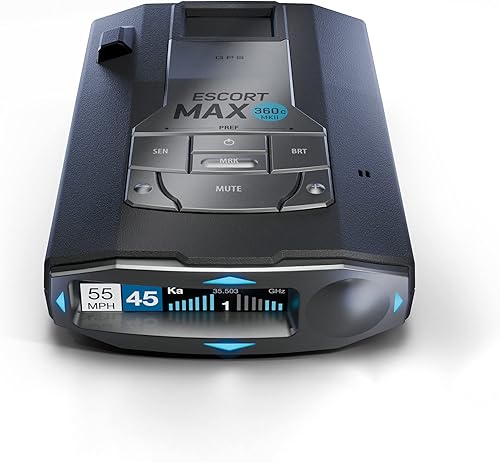
Escort MAX 360c MKII: Best for arrows and Wi-Fi
- Dual antennas
- Directional arrows
- GPS AutoLearn
- Dual-band Wi-Fi
Dual antennas and arrows indicate threat direction, while GPS AutoLearn can reject repeated false-alert locations. Wi-Fi supports over-the-air software updates.
Pros
- Directional arrows
- GPS AutoLearn
- Over-the-air updates
Cons
- Connected features may take setup time
The MAX 360c MKII suits drivers who want directional alerts alongside connected features. Dual antennas show threat direction, GPS AutoLearn can learn repeated routes, and dual-band Wi-Fi supports over-the-air software updates.
Its filtering is designed to reduce false alerts from collision-avoidance and blind-spot monitoring systems. CarPlay and Android Auto compatibility can show route information and alerts on a vehicle display.
Pick it if you want arrows and app connectivity in the same detector. Skip it if you prefer fewer connected features or want a more basic setup.
Our Escort MAX 360c MKII review covers the model in more detail.
Cobra RAD 490i: Best for alert control

- Adjustable sensitivity modes
- Front and rear laser detection
- Drive Smarter shared alerts
- USB-C power cord
Adjustable sensitivity and filtering modes let you control how often alerts come through. Front and rear LaserEye detection and shared alerts add useful context.
Pros
- Adjustable sensitivity
- Front and rear laser detection
- Mount and power accessories included
Cons
- Directional arrows are not specified
The RAD 490i fits drivers who want adjustable alert sensitivity and shared alerts. Its modes let you change how many notifications come through, while front and rear LaserEye detection can sense laser signals from both ends of the car.
It connects to Cobra's Drive Smarter community and supports CarPlay and Android Auto. The package includes a USB-C power cord, a USB-C cigarette-lighter adapter and an adhesive windshield mount with static cling film.
Choose it if alert controls and included mounting accessories are priorities. Skip it if you need directional arrows or GPS lockout memory, which are not specified for this model.
Radenso XP: Best for low-speed muting

- GPS lockouts
- Low-speed muting
- Automatic sensitivity adjustment by speed
- Windows and Mac updates
GPS lockouts let you save familiar false-alert locations, and low-speed muting can quiet alerts below a chosen speed. Automatic sensitivity adjustment also responds to driving speed.
Pros
- Route-based GPS lockouts
- Low-speed muting
- Speed-based sensitivity adjustment
Cons
- No directional arrows are specified
The Radenso XP focuses on GPS lockouts and quieter routine driving. You can save common false-alert locations, mute alerts below a chosen speed and let sensitivity adjust automatically based on speed.
Those route-based controls suit drivers who want to reduce repeat alerts without directional arrows. Radenso describes it as ready to use after mounting and plugging it in, and it can be updated from a Windows or Mac computer.
Pick the XP if you want GPS lockouts and speed-based muting without a long setup process. Skip it if you want arrows or community alerts.
For setup ideas, see our guide to installing a radar detector.
Cobra RAD 390: Best for basic laser alerts

- Front and rear LaserEye detection
- Adjustable sensitivity modes
- Firmware updates
- USB-C power cord
The RAD 390 pairs front and rear laser detection with adjustable sensitivity modes. It is a straightforward option for drivers who want control over alert volume.
Pros
- Front and rear laser detection
- Adjustable filtering
- Mount and power accessories included
Cons
- GPS lockout memory is not specified
The RAD 390 is a fit for drivers who want front and rear laser detection with adjustable filtering. Sensitivity modes let you control alert frequency, and the package includes a USB-C power cord, cigarette-lighter adapter and adhesive windshield mount with static cling film.
Its mount has a detachable bracket and adjustable angle, and firmware updates are available. GPS lockout memory and a phone connection are not specified.
Choose it if a straightforward detector with adjustable alerts and included mounting accessories meets your needs. Skip it if you rely on stored false-alert locations or want shared alerts.
If a connected Cobra model is a better match, compare it with the Cobra RAD 480i review.
Escort MAX 4: Best for route learning

- GPS AutoLearn
- Dual-core processing
- Drive Smarter shared alerts
- CarPlay and Android Auto compatible
GPS AutoLearn can reject repeated false-alert locations, and Drive Smarter adds community alerts. Choose it if those connected features matter more to you than directional arrows.
Pros
- GPS learns repeated routes
- Shared alerts
- Car display compatibility
Cons
- Directional arrows are not specified
The MAX 4 suits drivers who want GPS route learning and community alerts. AutoLearn can reject repeated false-alert locations, while Drive Smarter provides alerts shared by other drivers.
CarPlay and Android Auto compatibility adds a way to view route information, and the MAX 4 can pair with Escort's M2 dash cam. It does not specify directional arrows, so it fits drivers who value its connected features more than arrow-based context.
Pick it if route learning and shared alerts matter more to you than directional information. Skip it if arrows are a must-have.
Compare it with other options in our guide to the best radar detectors for the money.
What should you compare in a car laser detector?
The best laser detector for your car depends on which alerts you want and how much setup you are willing to manage. Start with directional information, GPS filtering and connected features, then decide whether each one solves a real need on your routes.
Are directional arrows useful on the best laser detector for car use?
Directional arrows help show whether a detected signal is ahead, behind or to one side. The Uniden R8W, Uniden R7 and Escort MAX 360c MKII specify arrows, so those are the clearest fits if you want signal direction on the display.
Arrows add context, but they do not confirm an officer's location or guarantee useful warning time. Keep your speed legal, and only glance at a display when it is safe to do so.
Does GPS filtering reduce repeated false alerts?
GPS filtering can remember recurring alert locations and mute them on repeat trips. The R8W, R7, R3, RAD 700i, MAX 360c MKII, Radenso XP and MAX 4 include route-based memory or AutoLearn features.
This can help with familiar false alerts, such as retail doors or repeated signals at the same location. It cannot identify every false alert, and the way you save or mute a location varies by detector.
Consider your routine before treating this as a must-have. If you mostly drive familiar routes, stored locations can make repeated trips quieter; if your routes change often, the feature may have less time to learn those patterns.
Do phone and vehicle connections matter?
Phone and vehicle connections matter if you want shared alerts or route information on a larger display. The Cobra RAD 700i, RAD 490i and Escort MAX 360c MKII support Drive Smarter community alerts, and those models also note CarPlay and Android Auto compatibility.
The R8W has Wi-Fi, Bluetooth and R/TACH app support. The MAX 360c MKII also uses Wi-Fi for over-the-air software updates, while the MAX 4 offers Drive Smarter alerts and car-display compatibility.
A connection adds setup steps and may involve using an app. Choose connected features when you expect to use them; if you want to rely on the detector's own screen and voice alerts, you can give them less weight.
How do you choose a laser detector for your car?
Choose by the information you want while driving, then check whether the controls and setup fit your routine. A long feature list helps only when its features answer questions you actually have on the road.
First, decide whether directional arrows are important. The R8W, R7 and MAX 360c MKII specify them; if you do not need direction on screen, the R3, Cobra models, Radenso XP and MAX 4 offer other features to compare.
Next, ask whether GPS mute memory would help on familiar routes. It can reduce repeat alerts in remembered locations, but it does not remove the need to interpret alerts carefully elsewhere.
Finally, decide whether you want app connections, community alerts, adjustable filtering or an uncomplicated plug-in setup. If legality is part of your decision, read our guide to using a radar detector legally and check the rules that apply to your route.
What setup steps help a car laser detector work as intended?
A clear, stable installation makes it easier to see and hear alerts without drawing attention away from the road. Follow the instructions for your chosen model, use its intended mount and power connection, and place the display where you can glance at it safely.
Before attaching a mount, pick a location that gives the detector a steady position and does not obstruct your view. Clean and dry the mounting area as the instructions direct, secure the bracket, then adjust the display angle before driving.
Connect the included or recommended power supply and check that the detector starts correctly while the car is parked. If your model offers GPS memory, sensitivity modes, voice alerts or phone pairing, learn those controls while stationary rather than adjusting them in traffic.
A windshield mount is not the only arrangement drivers consider. If you want a mirror-area installation, our guide to installing a radar detector from the rearview mirror walks through that setup.
How can you reduce distractions and maintain the detector?
Set the alert volume, display and sensitivity options before a trip so the detector gives information in a way you can process. Voice alerts can reduce the need to read every message, and GPS memory can help quiet repeat alerts on known routes.
Keep the detector and mount secure, and check periodically that the power connection has not loosened. Wipe the display and exterior with a soft, dry cloth unless the manufacturer gives different care instructions.
Check for available firmware or database updates through the method supported by your model. The R8W offers free database and firmware updates, the R7 and R3 also note free updates, and the Cobra RAD 490i and RAD 390 support firmware updates.
Do not mute an alert just because it is inconvenient or assume a familiar location will always behave the same way. Settings can reduce noise, but they cannot guarantee that every alert is false or that every threat will be detected.
What common buying and use mistakes should you avoid?
The most common mistake is assuming a laser alert guarantees time to react. Laser may be aimed directly at a vehicle, so a detector may sense it only after the speed measurement has happened.
Another mistake is paying for features you do not plan to use. If you will not pair a phone or check shared alerts, prioritize the detector's own display, spoken alerts and filtering instead of treating connectivity as essential.
Do not confuse front-and-rear laser sensing with directional arrows. Some models describe detection from both ends of the car but do not specify arrows to show where a signal is coming from.
Also avoid setting sensitivity without considering your route. A setting that is quiet on familiar roads may not suit a different route, while maximum alert volume can become distracting if you do not use the filtering controls available to you.
Which laser detector should you choose?
Choose the Uniden R8W if the best laser detector for car use means directional alerts, GPS mute memory and connected features in one device. Pick the R7 if arrows and a multi-signal display matter most, or the R3 if route filtering and voice alerts are enough without directional information.
Choose the Cobra RAD 700i or Escort MAX 360c MKII when shared alerts and vehicle-display compatibility fit your routine. The RAD 490i offers adjustable filtering, the Radenso XP focuses on GPS lockouts and low-speed muting, and the RAD 390 keeps the emphasis on adjustable alerts and included mounting accessories.
Pick the Escort MAX 4 if route learning and community alerts matter more than arrows. Whichever model you choose, use it as an alert tool, confirm local rules, and keep your attention on safe driving.
Our top 3 picks at a glance
-
1
-
2
-
3
Frequently asked questions
Do laser detectors give enough warning to slow down?
A laser alert may arrive only after an officer has aimed at your vehicle, so it may not give useful advance warning. Detection depends on the situation and line of sight.
Drive within the speed limit and treat alerts as information, not a guarantee of protection.
Do radar detectors detect lidar?
Many detectors can sense laser or lidar signals, but sensing a signal does not mean the detector can warn you before your speed is measured. For more detail, read our guide to whether radar detectors pick up lidar guns.
A detector is not a substitute for safe, legal driving.
Are laser detectors legal in every state?
No. Rules vary by location and can differ for passenger vehicles, commercial vehicles and military installations.
Check the laws that apply to your route before installing one.
Our guide to where radar detectors are illegal is a useful starting point.
What should I compare when choosing a laser detector?
Compare the alert direction, GPS mute memory, filtering controls, camera alerts and phone or car-display connections. A model with more features may take longer to set up, so weigh those tools against how much control you want while driving.
Our radar detector buying guide explains the main features.